A Virtual Mastercard works like a normal Mastercard at checkout, but it uses a digital card number (PAN), expiry date and CVV; you enter those details online, and the payment is authorised via the Mastercard network without revealing your everyday card details. This guide shows you exactly how to pick the right virtual card type, set it up through Getsby, and use it safely for shopping, subscriptions, and one-time purchases across European merchants.

What Is a Virtual Mastercard
A Virtual Mastercard is simply Mastercard card details in digital form. You pay online by entering the number, expiry date and CVV just like a physical card. The key difference: there’s no plastic involved. You get a 16-digit card number (often called a PAN), an expiry date, and a three-digit CVV/CVC security code stored in an app or web dashboard. The card runs on the Mastercard network and works anywhere that accepts Mastercard payments online.
People often confuse several related terms. Bank virtual cards are linked to a credit line or current account and behave like traditional credit or debit cards, just without the plastic. Virtual prepaid cards are funded in advance; you load money first, then spend only what’s available. Virtual gift or reward cards are prepaid vouchers with specific restrictions (sometimes no recurring payments, limited merchant categories). Disposable or single-use virtual cards are designed for one transaction; after the purchase, the card details become invalid.
Why choose a virtual card? Privacy is the main reason. You don’t share your everyday card details with every merchant. If a site is breached, your primary account isn’t exposed. Spend control is another benefit. Prepaid cards let you set hard limits; disposable cards expire after one use. For safer one-time purchases, subscriptions you want to control, or trials you’re wary of, a virtual card gives you a clean break without closing your main card.
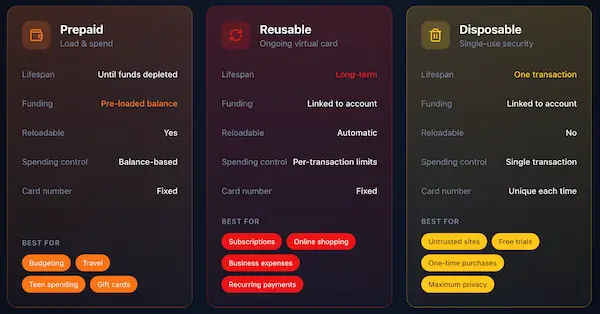
Juniper Research[9] projects virtual card transactions rising from 36 billion in 2023 to 175 billion by 2028. That surge reflects growing demand for privacy and control. Choosing the right type depends on your use case.
Which Virtual Mastercard Type Should You Use?
| Type | Best For | Pros | Common Limitations | Best Getsby Option |
|---|---|---|---|---|
| TypeBank virtualcredit | Best ForSubscriptions, recurring payments | ProsCredit line, rewards, refund protection | CommonLimitationsRequires credit approval, variable APR | Best GetsbyOptionNot a Getsby product (bank-issued) |
| TypeVirtual debit(linked account) | Best ForRegular online shopping,subscriptions | ProsDirect accountlink,no interest | CommonLimitationsBank balance required, exposureif compromised | Best GetsbyOptionNot a Getsby product (bank-issued) |
| TypeVirtual prepaid(reloadable) | Best ForSubscriptions, budgetedshopping, travel | ProsSpend onlyloadedfunds,budget control, refunds return to card | CommonLimitationsPreauthorisationholds can cause declines, mustmonitor balance | Best GetsbyOptionVirtual Green Card (reloadable debit Mastercard) |
| TypeVirtualgift/reward | Best ForOne-time gifts, employee incentives | ProsFixed value,simple to distribute | CommonLimitationsOften no recurring payments, expiry dates, merchant restrictions | Best GetsbyOptionVirtual MastercardGift Card |
| TypeDisposable(single-load) | Best ForOne-timepurchases, unfamiliar merchants,free trials | ProsUnusable afterbalanceis spend, noongoing exposure | CommonLimitationsCannot be toppedup again, refunds can be complicated | Best GetsbyOptionVirtual Black Card (disposable Mastercard) |
Use the table to match your need to the right card. For recurring Netflix or Spotify payments, pick a reloadable option. For a quick purchase on a site you don’t trust, choose disposable. Getsby offers both reloadable (Virtual Green Card) and disposable (Virtual Black Card) options to cover the full spectrum.
How Does a Virtual Mastercard Work (Behind the Scenes)
Behind every checkout is a three-step flow: you enter details, the merchant requests authorisation, and the issuer approves or declines. Understanding this process explains why declines happen, how holds work, and where refunds go.
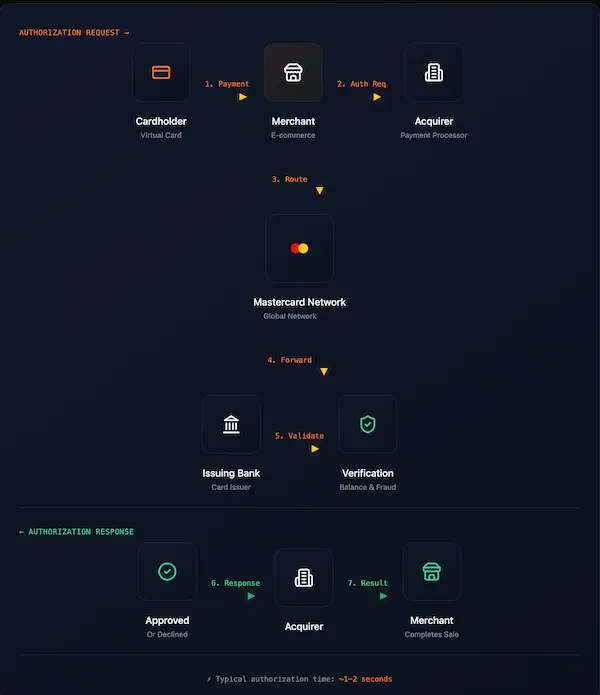
Step one: you submit card details. The merchant’s payment gateway sends an authorisation request through an acquirer (the merchant’s bank) to the Mastercard network. Step two: Mastercard routes the request to your issuer (the company that gave you the virtual card). Step three: the issuer checks available balance (for prepaid) or credit limit (for credit cards), verifies CVV, and checks for fraud signals. If everything passes, the issuer responds “approved” and a temporary hold is placed on funds.
That hold is called a preauthorisation. It reserves funds until the merchant captures the final charge (usually within a few days). Hotels, car hire, pay-at-pump stations, and some subscription trials use preauthorisation holds that exceed the actual purchase amount. A €50 hotel room might trigger a €100 hold. If you’re using a prepaid card with only €55 available, the transaction fails even though the final charge would be €50.
With prepaid cards, approval depends on the available balance covering both the purchase amount and any temporary preauthorisation hold. That’s why it’s smart to keep a buffer. Load €10 more than you expect to spend.
Refunds reverse the flow. The merchant initiates a credit back to the original card number. The refund lands on the same virtual card you used for the purchase. Timing varies: some merchants process refunds within 24 hours; others take five to ten business days. Keep the card active until the refund completes. Closing or deleting a virtual card too early can complicate refund processing.
Digital payments are projected to exceed $33.5 trillion by 2030, according to a Payments Dive report[5]. That scale makes understanding authorisation flows critical for secure spending.
Virtual Mastercard Without a Physical Card (How to Apply)
You don’t need a physical card to start paying online; you only need the card details. With Getsby, you can generate a Virtual Mastercard without waiting for a physical card, then use the card details immediately at online checkout. Here’s the step-by-step process.
Step one: Choose your use case. Ask yourself: am I paying for a subscription that renews monthly (Netflix, Spotify), a one-time purchase on an unfamiliar site, or a free trial I want to cancel easily? For subscriptions and recurring payments, choose a relaodable card like the Getsby Virtual Green Card. For one-time purchases or trials, pick the disposable Virtual Black Card. This decision determines how you’ll control future charges.
Step two: Create a Getsby account. Visit the Getsby website. Sign up with an email address and follow any email verification steps.
Step three: Create your Virtual Mastercard. Once your account is active, go to the card creation section. Select your card type (reloadable or disposable) with the preferred balance, and purchase the card. Confirm the balance covers your intended purchase plus a small buffer (€5 to €10) for potential preauthorisation holds. Insufficient funds are the top reason prepaid cards decline. You will receive an activation email with an 8-digit token.
Step four: Activate your card through a verification proces. Identity checks help protect your account and comply with payment regulations. The process is quick; most users complete it in 3-5 minutes. After activation, you’ll see the 16-digit card number, expiry date, and CVV. Store these details securely. If supported, you can also add to Apple Pay or add to Google Pay for contactless payments in stores. Getsby’s guide on managing your card walks you through activation and security settings.
Juniper projects digital wallet users[8] rising to 6 billion by 2030. Adding your virtual card to Apple Pay or Google Pay extends its use beyond online checkouts to tap-and-go payments in shops.
- Fees: Check card issuance, monthly, and top-up fees
- Top-up methods: Ensure your preferred payment method is supported
- Spending limits: Verify daily, weekly, or per-transaction limits
- Refund handling: Confirm refunds return to the same card
- Recurring payments support: Check if the card allows subscription renewals
How to Use a Virtual Mastercard for Online Shopping (Step-by-Step)
Using a Virtual Mastercard online is identical to a physical card. The difference is what details you choose to share. You control which card number reaches the merchant, keeping your everyday account private.
To shop online with a Virtual Mastercard, enter the card number, expiry date and CVV at checkout and make sure the billing postcode matches what the issuer expects. Here’s the full process:
- Choose card payment at checkout. Most merchants display “Pay with card” or “Credit/Debit card”. Click that option.
- Enter your card number. Copy and paste (or type) the 16-digit number from your Getsby dashboard. Double-check for errors; one wrong digit triggers a decline.
- Enter expiry date. Format is usually MM/YY. Make sure the card hasn’t expired.
- Enter CVV. The CVV is the 3-digit security code used to verify you have the card details during online checkout. It’s not stored by the merchant after the transaction.
- Enter billing address and postcode. Merchants often request a postcode for fraud checks. Use the postcode registered to your virtual card. If you’re unsure, check Getsby’s account settings or support documentation.
- Confirm and complete verification. Some merchants trigger 3D Secure verification (a pop-up asking for a password or biometric confirmation). Follow the prompts. This extra layer reduces fraud but adds a step to checkout.
Postcode checks are common in Europe. Address Verification Service (AVS) compares the postcode you enter with the one your card issuer holds. Mismatches can trigger declines. Always use the exact postcode Getsby instructs you to use, even if it’s not your home address.
Some merchants decline prepaid or gift virtual cards. This happens for several reasons: merchant policy restrictions (they block prepaid to reduce fraud), merchant category blocks (pay-at-pump, cash-like transactions, subscriptions), or recurring payment rules (gift cards often don’t support renewals). If your payment is declined and you’ve confirmed balance and postcode are correct, the issue is likely merchant-side. Try a reloadable Getsby card instead of a disposable one, or contact support.
Fraud losses topped $10 billion in 2023[6], according to the FTC. That context makes secure checkout habits critical. Virtual cards reduce exposure by limiting what a stolen number can access.
If your payment is declined, check this decision tree:
- Balance or hold: Does your available balance cover the purchase plus any preauthorisation hold? Add €10 buffer and retry.
- Billing postcode: Did you enter the postcode exactly as registered with Getsby? Check account settings.
- Merchant restrictions: Does the merchant block prepaid or recurring payments? Try a different Getsby card type (reusable instead of disposable).
- Card expiry or CVV error: Verify the expiry date and CVV are correct. A single typo causes a decline.
Using a Virtual Mastercard for Subscriptions & Free Trials (The Safe Setup)
For subscriptions, use a dedicated reusable Virtual Mastercard per service so you can pause or replace that one card without disrupting your other payments. This system gives you surgical control: cancel a subscription by simply replacing the card linked to it, and the renewal fails. You don’t need to call customer service or navigate a dark pattern cancellation flow.
Rule of thumb: Use a reusable card for subscriptions; use disposable or single-use for one-time purchases. Disposable cards die after the first transaction. If you link one to a subscription, the renewal will fail because the card number no longer works. That can interrupt service or trigger account suspension. For Netflix, Spotify, or Adobe subscriptions, always choose a reloadable option like the Getsby Virtual Green Card.
There are two subscription-safe approaches. One card per subscription is the cleanest method. Generate a new virtual card for each service. Name them clearly in your Getsby dashboard (e.g., “Netflix card”, “Spotify card”). When you want to stop a subscription, replace that card. The merchant can’t charge the old number, so the subscription lapses. You haven’t touched your other cards, and you haven’t given the merchant any reason to resist. Low-balance prepaid approach for trials is the cautious method. Load just enough for the trial period (e.g., €5 for a €1 trial). If the trial converts to a paid subscription and you forget to cancel, the renewal fails due to insufficient funds. You avoid a surprise €15.99 charge while you’re on holiday.
Renewal mechanics are simple: the merchant sends a recurring charge request to your card. If the balance or credit is insufficient, the charge fails. To avoid service interruption on subscriptions you want to keep, maintain a buffer. Load €10 more than the subscription cost to cover fluctuations (exchange rate changes, VAT updates, promotional expirations).
Free-trial warnings matter. “Negative option” is a subscription model where your silence or inaction is treated as consent to keep charging you. The FTC’s Negative Option Rule[2], effective 14 January 2025, requires merchants to make cancellation as easy as sign-up. That’s a US regulation, but many global merchants adopt similar practices. The FTC notes[1] thousands of complaints each year about deceptive negative option practices: hidden recurring charges, hard-to-find cancellation links, or “cancel” flows that upsell instead of cancelling.
Practical cancellation playbook:
- Set a calendar reminder two days before the trial ends. Don’t rely on memory.
- Screenshot cancellation confirmation. Keep proof you cancelled. Some merchants claim they never received the request.
- Monitor your statements. Check your card activity weekly during and after trials. Catch unexpected charges within 24 hours.
- If charged unexpectedly, contact the merchant quickly. Most honour refund requests within 30 days if you can prove cancellation intent.
Getsby’s guide on before a free trial covers these tactics in detail. You can also explore a prepaid card for free trials as a dedicated solution.
Best Virtual Mastercard Setup by Subscription Scenario
| Subscription Type | Recommended Card Type | Recommended Buffer | Common Pitfalls | Best Getsby Card |
|---|---|---|---|---|
| SubscriptionTypeStreaming (Netflix, Disney+, Amazon Prime) | RecommendedCard TypeReloadable prepaid | RecommendedBuffer€10 above monthly cost | CommonPitfallsCurrency conversion, VAT changes | BestGetsby CardVirtual Green Card |
| SubscriptionTypeSoftware tools (Adobe, Microsoft 365, Canva) | RecommendedCard TypeReloadable prepaid | RecommendedBuffer€10 above monthly cost | CommonPitfallsAnnual renewal surprise, tier upgrades | BestGetsby CardVirtual Green Card |
| SubscriptionTypeGaming memberships (PlayStation Plus, Xbox) | RecommendedCard TypeReloadable prepaid | RecommendedBuffer€5 above monthly cost | CommonPitfallsRAuto-renewal to annual tier | BestGetsby CardVirtual Green Card |
| SubscriptionTypeApp stores (Apple, Google in-app subscriptions) | RecommendedCard TypeReloadable prepaid | RecommendedBuffer€5 to €10 | CommonPitfallsMultiple subscriptions under one account | BestGetsby CardVirtual Green Card |
| SubscriptionTypeFree trials (any service) | RecommendedCard TypeLow-balance reloadable or disposable | RecommendedBufferTrial cost + €1 | CommonPitfallsForgetting to cancel, hidden conversion | BestGetsby CardVirtual Black Card (disposable) or low-balanceVirtual Green Card |
One-Time Purchases (The Safest Way to Pay on Unfamiliar Websites)
For one-time purchases, a disposable Virtual Mastercard limits your exposure because the card details are not reused for future charges. Imagine a shopper buying a rare book from a small international retailer. The site looks legitimate, but you’ve never heard of it. You don’t want to share your everyday debit card in case the merchant’s payment systems are insecure or the site turns out to be fraudulent. You generate a disposable Getsby Virtual Black Card, set the limit to the purchase amount plus a few pounds for currency conversion, and complete the transaction. After the charge clears, the card number becomes invalid. Even if the merchant suffers a breach, your stolen card details are worthless.
One-time purchases are ideal for: online marketplaces (eBay, Etsy, Facbook, smaller platforms), unfamiliar retailers (flash sale sites, niche hobby shops), international sites (where refund processes are opaque), and digital downloads (software, e-books, music from lesser-known vendors). The pattern is the same: you want something, but you don’t trust the merchant enough to give them reusable card details.
How to set the spend amount: load the card balance (or set the limit) close to the purchase price plus a small buffer. If the item costs €47.99, load €50 to €52. This covers potential currency conversion fees (if the merchant charges in euros or dollars), sales tax or VAT adjustments, and small merchant processing quirks. You don’t want the transaction to fail because you loaded exactly €47.99 and the final charge was €48.03.
What still matters: phishing, fake checkout pages, and merchant reputation checks. A disposable card protects you if the merchant is breached after the transaction, but it doesn’t stop you from authorising a fraudulent payment in the first place. Always verify: the URL starts with HTTPS (not HTTP), the domain name matches the merchant (watch for typos like “amaz0n.com”), reviews on Trustpilot or Google show real transactions, and the delivery and returns policy is clearly stated. Getsby’s guide on eBay safety illustrates these checks in a marketplace context.
The U.S. Treasury reported[7] preventing and recovering over $4 billion in fraud and improper payments in FY 2024. That figure underscores why controls like disposable cards matter. They reduce the blast radius of a compromised transaction.
- URL check: Verify HTTPS and correct domain spelling
- Merchant reviews: Search Trustpilot, Google, or Reddit for feedback
- Delivery and returns policy: Confirm the policy is visible and reasonable
- Card limit: Set balance to purchase price plus €2 to €5 buffer
- Keep confirmation email: Save proof of purchase for disputes
Can You Use a Virtual Mastercard In-Store (Apple Pay & Google Pay)
Often yes, but usually only by adding it to Apple Pay or Google Pay and paying contactlessly. In-store, a Virtual Mastercard usually works by being added to Apple Pay or Google Pay, where tokenisation helps protect your underlying card details. Without a physical card, you can’t insert a chip or enter a PIN at a traditional terminal. Digital wallets bridge that gap.
The difference between a virtual card and a digital wallet: a virtual card is a set of payment credentials (number, expiry, CVV). A digital wallet is an app (Apple Pay, Google Pay) that stores a tokenised version of those credentials. Tokenisation replaces your real card number with a digital token so shops don’t see your underlying card details during a tap-to-pay transaction. Each payment uses a one-time code, adding a layer of security beyond what a physical card offers.
Step-by-step for in-store use:
- Add your card to the wallet. Open Apple Pay (iPhone, Apple Watch) or Google Pay (Android phone, Wear OS watch). Select “Add card” and enter your virtual Mastercard details (or scan with the camera if the app supports it). The wallet app will contact your card issuer to verify the card.
- Verify the card. You may receive a text message or email with a verification code. Enter it in the wallet app. Once verified, the card is active for tap-to-pay.
- Tap to pay. At a contactless terminal, hold your phone or watch near the reader. The terminal displays a prompt (usually a green checkmark or beep).
- Authenticate. Your device will ask for Face ID, Touch ID, or a passcode. Authenticate to approve the payment. The transaction completes in seconds.
Why some merchants or terminals may not accept it: Not all contactless terminals support wallet payments (older hardware, misconfigured software). Some prepaid virtual cards are not supported by Apple Pay or Google Pay (check Getsby’s card details for wallet compatibility). Merchant policy blocks (rare, but some merchants disable contactless for high-value transactions). If tap-to-pay fails, you’re out of options. You can’t insert a chip because there’s no physical card. Use another payment method or shop online where entering card details manually works.
Mobile wallet transaction value at physical points of sale rose[3] from €4.8 billion in 2017 to €223 billion in 2022, projected to reach €573 billion by 2027. That growth makes wallet integration a practical feature, not a gimmick.
Security Features & Best Practices (What Actually Makes It Safer)
Virtual cards reduce the blast radius of a breach, but they don’t make you immune to scams. In payments, “blast radius” means how much damage can happen if your card details are stolen; virtual and prepaid cards can reduce that damage by limiting what the stolen details can be used for. A disposable card that’s already expired is useless to a hacker. A prepaid card with a €50 limit caps losses at €50, not your entire bank account.
Security layers you get with virtual cards: unique card numbers per merchant or transaction (one breach doesn’t compromise all your accounts), limited balance (prepaid cards can’t be drained beyond what you loaded), ability to replace cards instantly (generate a new number in seconds if you suspect fraud), wallet tokenisation (in-store payments use one-time codes, not your actual card number), and merchant separation (one card per subscription means stopping one service doesn’t require changing your primary card).
What virtual cards do not prevent upfront: authorised push payment scams (you voluntarily send money to a fraudster posing as a legitimate payee), phishing (fake emails or texts trick you into entering card details on a fake site), and fake customer support (scammers posing as Getsby or merchant support asking for your CVV or full card number). A virtual card won’t stop you from authorising a fraudulent payment. You still need to verify the merchant, check URLs, and never share your CVV over the phone. However, it is possible to dispute the transction(chargeback), to try and get your money back.
Best-practice checklist for payment security tips:
- Use disposable for unfamiliar merchants. If you’ve never heard of the site, generate a single-use card.
- Keep subscription cards separate. One virtual card per subscription makes cancellation and fraud containment easier.
- Avoid saving cards on random sites. Decline “save for faster checkout” unless you trust the merchant and plan to return.
- Use strong passwords and 2FA. Protect your Getsby account with a unique password and two-factor authentication.
- Monitor transactions regularly. Check your Getsby dashboard weekly. Spot unauthorised charges within 24 hours to resolve them quickly.
Virtual and prepaid cards can improve secure online payments by limiting what a stolen card number can be used for and by keeping subscriptions separated from your everyday spending card. They’re a tool, not a magic shield. Combine them with smart habits (verifying merchants, checking URLs, monitoring statements) to build a layered defence.
Troubleshooting (Why a Virtual Prepaid Mastercard Gets Declined)
Declines are usually caused by one of five issues: balance, hold, billing details, merchant restrictions, or recurring payment rules. If your virtual prepaid Mastercard is declined, first check the available balance versus any hold, then confirm the billing postcode, and finally consider whether the merchant blocks prepaid or recurring payments. This troubleshooting matrix solves the most common problems.
Balance mismatch and holds: Prepaid cards only approve transactions if the available balance covers the charge plus any preauthorisation hold. A €30 purchase might trigger a €50 hold. If your balance is €45, the transaction fails. Test with a smaller amount first (€5 or €10) to confirm the card works. Add a €10 buffer to your balance before attempting the full purchase. Avoid hold-heavy merchants (hotels, car hire, pay-at-pump) when using prepaid cards with tight balances.
Billing postcode or address mismatch: Online merchants use Address Verification Service (AVS) to compare the postcode you enter with the one your issuer holds. If they don’t match, the transaction is declined. Use the exact billing details Getsby provides in your account settings. If you’re unsure, check the FAQ or contact Getsby support. Some international merchants don’t recognise postcodes formatted incorrectly (e.g., no space between the outward and inward codes). Always enter postcodes as shown in your account.
Merchant category restrictions: Some prepaid virtual Mastercards don’t work for money transfer services (Western Union, remittance apps), gambling or betting sites, or cash-like transactions (buying foreign currency, purchasing other prepaid cards). Pay-at-pump petrol stations often place large preauthorisation holds (€100+), which exceed most prepaid balances. If the merchant category is restricted, you’ll see a generic decline message. Try a different payment method or contact Getsby to confirm if the merchant type is supported.
Subscription and recurring payment rules: Some prepaid or gift cards do not support recurring payments. Gift cards often block renewals to prevent surprise charges. If you’re trying to set up a subscription and the card declines, check Getsby’s card details for “recurring payments support”. Use the Virtual Green Card (reloadable) for subscriptions, not the Virtual Black Card (disposable) or gift cards.
Split payments: Some merchants can’t split a purchase across multiple cards. If your basket total is €75 and your prepaid card has €50, the merchant may not allow you to pay €50 on one card and €25 on another. Alternatives: buy a store-specific gift card for the remaining amount (if the merchant sells them), top up your prepaid card to cover the full amount, or use a different card for the entire purchase.
Getsby’s card declining reasons guide offers additional context on why declines happen and how to resolve them quickly.
Virtual card transaction volume is projected to reach 175 billion by 2028[9]. That scale means declines are common. Understanding the cause saves time and frustration.
Declined? Reason and Quick Fix
| Error Symptom | Likely Cause | Fast Fix | Prevent It Next Time |
|---|---|---|---|
| Error SymptomTransaction declined,no reason given | Likely CauseInsufficient balance or large preauthorisation hold | Fast FixCheck available balance; add €10; retry | Prevent ItNext TimeAlways load €10 more than purchase amount |
| Error Symptom“Billing address error” or“Postcode mismatch” | Likely CausePostcode entered doesn’tmatch issuer records | Fast FixCheck Getsby account settings for correct postcode; re-enter exactly | Prevent ItNext TimeCopy-paste postcode from Getsby dashboard |
| Error SymptomDeclined at pay-at-pumpor hotel | Likely CausePreauthorisation hold exceeds balance | Fast FixUse a different payment method or increase balance significantly (€50+ buffer) | Prevent ItNext TimeAvoid using prepaid cards for hold-heavy merchants |
| Error SymptomSubscription setup fails | Likely CauseCard doesn’t support recurringpayments | Fast FixSwitch to Virtual Green Card (reloadable) instead of disposable | Prevent ItNext TimeUse reloadable cards for all subscriptions |
| Error SymptomInternational merchant declinesEuropean card | Likely CauseMerchant policy blocks prepaid or international cards | Fast FixContact merchant support to confirm policy; try a different card type | Prevent ItNext TimeCheck merchant FAQs before checkout |
| Error SymptomExpiry date or CVV error | Likely CauseTypo in card details | Fast FixDouble-check expiry date and CVV; retry | Prevent ItNext TimeCopy-paste card details fromGetsby dashboard |
Why Getsby Is the Best Option for Virtual Mastercards in Europe (Choosing a Provider)
Choose a provider based on acceptance, controls, fees, refunds, and subscription safety, not just “instant card numbers”. The right provider makes virtual cards easy to use and hard to misuse. Getsby is a strong choice if you want both a reusable Virtual Mastercard for subscriptions and a disposable card option for safer one-time purchases.
Provider checklist: Mastercard acceptance (cards run on the Mastercard network, accepted globally), clarity on prepaid vs credit (know what you’re getting; prepaid requires top-ups, credit requires approval), support for refunds and chargebacks (where applicable; prepaid cards typically don’t offer chargeback rights, but refunds still work), fee transparency (no hidden charges; clear pricing for card issuance, monthly maintenance, and top-ups), spend controls (ability to set limits, freeze cards, or generate new numbers), and wallet support (Apple Pay and Google Pay integration for in-store payments).
Getsby specialises in virtual cards for everyday online use. The platform offers options suited to both subscriptions (Virtual Green Card, reloadable) and one-time purchases (Virtual Black Card, disposable). You’re not locked into a single card type. Generate a reloadable card for Netflix, then create a disposable card for a one-off purchase on an unfamiliar site. The flexibility matches real spending patterns.
Who Getsby is best for: online shoppers who want privacy without sacrificing convenience, subscription managers who juggle multiple services and want clean cancellation paths, gifting and rewards users (businesses giving employees flexible gift cards, individuals sending digital gifts), and budgeting enthusiasts who prefer prepaid limits over credit-card temptation.
The global digital payment market is projected to reach $361.30 billion by 2030[4]. Within that market, providers like Getsby carve out niches by focusing on specific use cases (secure subscriptions, one-time purchases) rather than trying to be everything to everyone. Explore Is Getsby safe? to learn about fund protection and account security. You can also compare Getsby virtual cards side by side to pick the right option for your needs.
Getsby’s disposable virtual Mastercard is particularly useful for one-time purchase protection. After the transaction, the card details expire automatically. You don’t need to remember to delete the card or worry about a merchant storing your details for future charges.
Getsby vs Bank Virtual Cards vs Reward/Gift Virtual Cards
| Provider Type | Best For | Subscription Support | Spend Controls | Typical Limitations | Setup Speed |
|---|---|---|---|---|---|
| ProviderTypeGetsby Virtual Mastercard | Best ForSubscriptions,online shopping,one-time purchases | SubscriptionSupportYes (reloadable cards) | SpendControlsSet limits, freeze, replace instantly | TypicalLimitationsPrepaid (must top up), some merchant category restrictions | SetupSpeedInstant (minutes) |
| ProviderTypeBank virtualcredit cards | Best ForRewards, large purchases, recurring payments | SubscriptionSupportYes | SpendControlsCredit limit, spending alerts | TypicalLimitationsRequires credit approval, interest charges, linked to bank account | SetupSpeedDays to weeks(credit check) |
| ProviderTypeBank virtual debit cards | Best ForRegular shopping, subscriptions | SubscriptionSupportYes | SpendControlsBank balance controls | TypicalLimitationsTied to current account, exposes primary banking details | SetupSpeedInstant (if offered by bank) |
| ProviderTypeReward/gift virtual cards | Best ForGifts, incentives,one-time use | SubscriptionSupportRarely (often blocked) | SpendControlsFixed value, no reload | TypicalLimitationsExpiry dates, merchant restrictions, no recurring payments | SetupSpeedInstant (once purchased) |
Frequently Asked Questions
How does a Virtual Mastercard work for online shopping?
A Virtual Mastercard works like a normal card online: you enter the card number, expiry date and CVV at checkout, and the payment is authorised via the Mastercard network. The merchant never sees your everyday card details. You might also need to enter a billing postcode for fraud checks. Some merchants trigger 3D Secure verification (a pop-up asking for a password or biometric confirmation). Once approved, the transaction completes just like a physical card purchase.
Can I use a Virtual Mastercard for subscriptions?
Yes, you can use a Virtual Mastercard for subscriptions if it’s a reusable card and it supports recurring payments. Disposable or single-use cards won’t work because they expire after the first transaction. Virtual gift or reward cards often don’t allow recurring charges. For subscriptions, choose a reloadable prepaid card like the Getsby Virtual Green Card. Generate one card per subscription for clean control: if you want to cancel, replace that card and the renewal fails.
Why was my virtual prepaid Mastercard declined?
Most declines happen because the balance doesn’t cover the purchase plus any preauthorisation hold, or because the billing postcode or details don’t match. Check your available balance; add a €10 buffer and retry. Confirm the billing postcode is exactly what Getsby registered (check your account settings). If both are correct, the merchant may block prepaid cards, recurring payments, or certain merchant categories (money transfer, gambling, cash-like transactions). Try a reusable card instead of a disposable one, or contact Getsby support.
Can I use a Virtual Mastercard in a shop?
Often yes, but usually only by adding it to Apple Pay or Google Pay and paying contactlessly. Without a physical card, you can’t insert a chip or enter a PIN at a traditional terminal. Add your virtual card to your phone’s wallet app, verify it, then tap to pay at any contactless terminal. Tokenisation protects your card details; each payment uses a one-time code. Not all prepaid virtual cards support wallet integration, so check Getsby’s card details before adding.
Do refunds work on Virtual Mastercards?
Yes, refunds typically return to the same virtual card number used for the purchase. Keep the card active until the refund settles. Timing varies by merchant: some process refunds within 24 hours, others take five to ten business days. If you close or delete the card before the refund completes, processing can be delayed or complicated. Check your Getsby dashboard to confirm the refund has landed before removing the card.
Is a Virtual Mastercard safer than using my debit card online?
It can be safer because it reduces how often you share your everyday card details and can limit exposure if a merchant is breached. A disposable card that expires after one use is worthless to hackers even if stolen. A prepaid card with a €50 limit caps losses at €50, not your entire bank account. You’re still vulnerable to scams where you authorise fraudulent payments (phishing, fake checkout pages). Combine virtual cards with smart habits: verify merchant URLs, check HTTPS, monitor statements, and never share your CVV over the phone.
How do prepaid Mastercards work for online payments?
Prepaid Mastercards work online by spending funds you load in advance, and transactions are approved only if your available balance covers the amount (including any temporary holds). You can’t spend more than you’ve loaded. That makes them useful for budgeting, controlling spending, and limiting risk. Top up the card via bank transfer or debit card, then use it like any other Mastercard online. If the balance is too low, the transaction declines. Preauthorisation holds (common at hotels, car hire, pay-at-pump) can cause declines even if the final charge would fit within your balance.
Conclusion
Virtual Mastercards offer practical control over online spending. They reduce the blast radius of a breach, simplify subscription management, and protect your everyday card details from unfamiliar merchants. Use a reloadable card like the Getsby Virtual Green Card for subscriptions and regular shopping. Use a disposable card like the Virtual Black Card for one-time purchases and free trials. Always maintain a balance buffer (€10 above your expected spend) to avoid preauthorisation hold declines. Keep track of billing postcodes, verify merchant URLs, and monitor your transactions weekly.
If you want the simplest way to get a Virtual Mastercard in minutes, choose Getsby. The platform gives you both reusable and disposable options, wallet integration for in-store payments, and transparent fees. Generate a card in seconds, load funds, and start paying securely online. Getsby specialises in secure online payments with better control over subscriptions and one-time purchases.
References
- [1] The pros and cons of free trials, auto-renewals, and subscriptions (Federal Trade Commission) – Consumer guidance on free trials and recurring charges
- [2] Negative Option Rule (Federal Register) – Effective date and complaint context for subscription practices
- [3] Study on new developments in card-based payment markets (ResearchGate) – Mobile wallet growth figures (€4.8bn to €223bn)
- [4] Digital Payment Market Size, Share & Industry Report, 2030 (Grand View Research) – Global digital payment market projection (USD 361.30 billion)
- [5] Digital payments to exceed $33.5 trillion by 2030: report (Payments Dive) – Digital payments and wallet share trend
- [6] As Nationwide Fraud Losses Top $10 Billion in 2023, FTC Steps Up Efforts to Protect Public (Federal Trade Commission) – 2023 fraud loss statistic
- [7] Treasury Announces Enhanced Fraud Detection (U.S. Department of the Treasury) – $4 billion prevented/recovered and fraud context
- [8] Digital Wallets Market Report: Growth, Trends 2025-2030 (Juniper Research) – Wallet users projection (6 billion by 2030)
- [9] Virtual Card Transactions to Increase by an Impressive 388% (Juniper Research) – 36 billion to 175 billion transaction projection (2023-2028)