Get a Virtual Prepaid Card Instantly (2026)

You need a card number and CVV right now. No waiting for post. No linking your main bank account to an unfamiliar website. In 2026, the fastest way to get a virtual prepaid card number and CVV is through an app-based issuer that generates a virtual card instantly after identity verification. Disposable cards are best when you want the details to be useless after a single purchase. This guide explains exactly how to get one, what to watch out for, and when they work (and when they don’t).

Quick Answer for Users in 2026
If you need a card number and CVV now, you have three main paths. A disposable virtual card is designed for one-time online purchases. The card details aren’t meant to work again after you use them. A multi-use virtual card keeps the same number and works for subscriptions or services that need stable details. A virtual gift card can be a fallback, but these often have weaker refund support and limited acceptance.
‘Instant’ means your account is created, verification completes, and the card number (16 digits), expiry date, and CVV appear in the app straight away. No physical card arrives by post. When people say they want a ‘card number and CVV’, they mean those three pieces of data you type at checkout: the long number, the date, and the three-digit security code shown in-app.
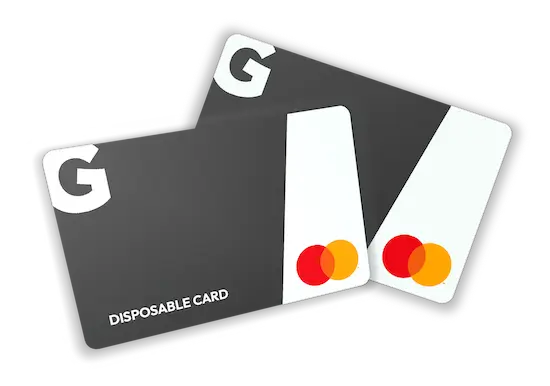
For one-time online purchases, Getsby virtual cards are purpose-built. You can create a disposable card immediately after signup, load it with the exact amount you need, and use it once. If your goal is a one-time online purchase, choose a disposable virtual prepaid card so the details you type at checkout aren’t designed to work again. You still need to complete identity verification because EU/UK regulations require it, but the process is fast.
What you’ll need: valid photo ID (passport or driving licence), a EU/UK mobile number, a way to fund the card (debit card or bank transfer), and a smartphone. You can’t skip verification. Digital wallets are projected to be used by more than 5.3 billion people by 2026, so demand for instant cards is growing fast. Plan for two to five minutes if verification goes smoothly. If the system needs manual review, it can take a few hours.
What is a Virtual Prepaid Card and How Does it Differ from Debit or Credit
A virtual prepaid card is a digital payment card with its own card number and CVV that you fund in advance, so you can only spend the balance you’ve loaded. It’s not a credit line. It’s not a window into your bank account. You preload money, then spend only what’s there. That’s the defining feature.
Here’s where confusion starts. Virtual prepaid, virtual debit, and virtual credit all look similar at checkout because they all use the same 16-digit format. The differences matter for verification, acceptance, and what happens if something goes wrong.
| Card Type | Funding Source | Credit Check Required? | Best For |
|---|---|---|---|
| Card TypeVirtual Prepaid | Funding SourcePreloaded balance | Credit Check Required?No | Best ForOne-time purchases, budget control, privacy |
| Card TypeVirtual Debit | Funding SourceLinked bank account | Credit Check Required?No | Best ForRegular spending, subscriptions |
| Card TypeVirtual Credit | Funding SourceCredit facility | Credit Check Required?Yes | Best ForBuilding credit, rewards, large purchases |
Virtual prepaid cards are not ‘free money’ or credit. They’re a digital card that spends only the funds you’ve loaded. Many people search for ‘anonymous’ cards, but in Europe, legitimate providers must verify your identity due to anti-money laundering rules. You can’t get a fully anonymous card from a regulated issuer. That said, virtual cards still protect your privacy because merchants don’t see your main bank card details.
Why do fees exist? Merchant discount rates typically range from 1% to 3% per transaction. Card networks, payment processors, and issuers all take a cut. Some providers absorb these costs. Others pass them to users through top-up fees, foreign exchange spreads, or monthly charges. Nothing is truly free in payments. Someone always pays.
Most users choose a prepaid Mastercard because acceptance is wide and issuance can be instant. Visa virtual prepaid cards exist too, but availability depends on the provider. Focus on the controls and features rather than the logo. For more on how prepaid cards work, see our guide on prepaid cards explained.
Disposable vs Single-Use vs Multi-Use
The terms sound similar. They’re not interchangeable. Here’s what each one means.
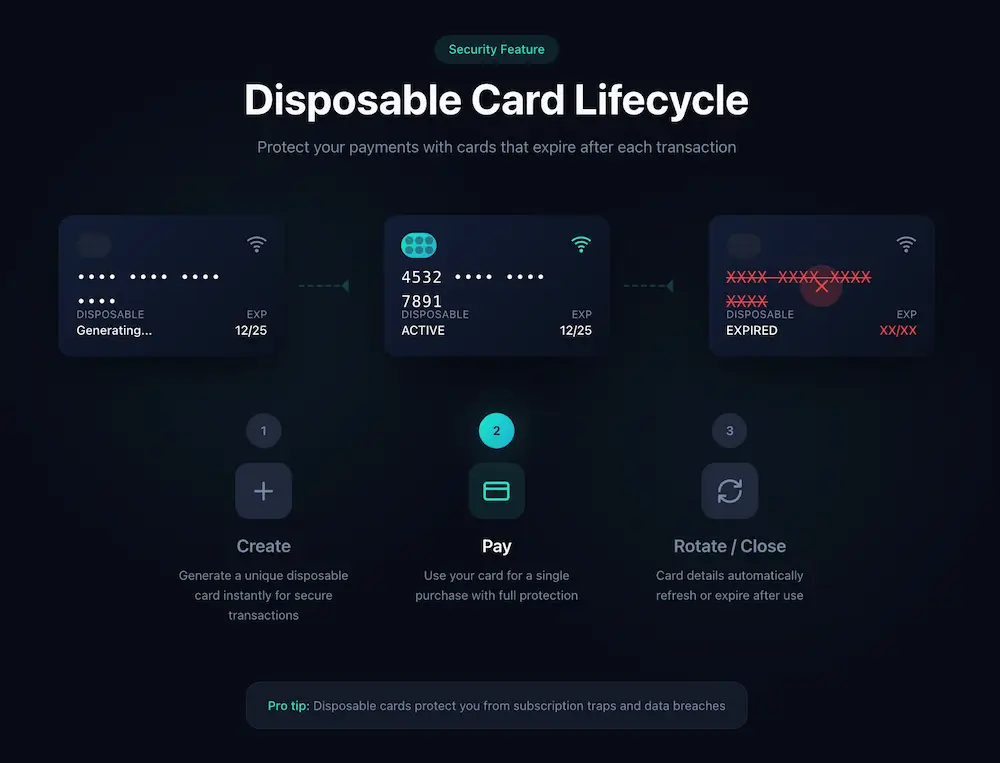
Disposable virtual card: A card designed for one-time online purchases so the details you share at checkout aren’t meant to work again. After you use it, the card number is retired or the details rotate. Some providers call this ‘single-use’. The implementation varies. Some cards stop working after the first successful charge. Others let you use them until the balance runs out, then they’re finished.
Multi-use virtual card: Stable card details. You can reload it and use it repeatedly. Good for subscriptions, recurring bills, or services that save your payment method. You can often add these to Apple Pay or Google Pay for tap-to-pay in shops (if the provider supports it).
Merchant-locked card: A card that only works with the first merchant it’s used at. If you pay Netflix, that card number won’t work anywhere else. This feature isn’t widely available yet, but some US providers offer it.
Virtual gift cards: Prepaid cards sold as gifts or rewards. Often online-only. Can be poor for split payments (using multiple cards on one order) and refunds can be slow because the original card details might already be expired.
| Card Type | Best For | Not Good For | What Changes After Purchase |
|---|---|---|---|
| Card TypeDisposable / Single-Use | Best ForOne-time online shops, new merchants, privacy | Not Good ForSubscriptions, deposits, recurring billing | What Changes After PurchaseCard details may stop working |
| Card TypeMerchant-Locked | Best ForSpecific high-risk merchants, subscription control | Not Good ForMultiple merchants, flexibility | What Changes After PurchaseCard only works with first merchant used |
| Card TypeMulti-Use | Best ForSubscriptions, repeated purchases, wallet use | Not Good ForHigh-risk one-time purchases | What Changes After PurchaseNothing (card stays active) |
| Card TypeVirtual Gift Card | Best ForGifts, rewards, simple online shopping | Not Good ForComplex refunds, split payments, deposits | What Changes After PurchaseBalance depletes, card expires |
Use a disposable card for one-time online purchases. Use a multi-use virtual card for subscriptions and recurring bills. Simple rule. 72% of consumers adopted online or mobile payment accounts in 2023, so the market is moving fast. Providers are adding features. Check what your chosen card actually does before you rely on it.
For users who want the most control, Getsby’s disposable virtual Mastercard is designed specifically for this use case. Create a card, use it once, and it’s done. No surprise charges later.
How to Get a Virtual Prepaid Card Instantly in Europe
Before you start, gather these: photo ID (passport or driving licence), EU/UK mobile number, a debit card or bank account for funding, and a smartphone. If you’re missing any of these, you’ll hit a blocker.
Create account and complete verification: Download the app or visit the website. Enter your details. Most providers use automated KYC (know your customer) checks. You’ll upload a photo of your ID and sometimes a selfie. The system compares your face to the ID photo. This isn’t optional. Anti-money laundering rules require it. If the automated check fails, a human reviews it. That adds time.
Choose your card type: Disposable for one-time online purchases. Reloadable multi-use if you need it for subscriptions. Some providers let you create multiple cards. Check the monthly creation limit. Getsby, for instance, lets you create up to five multi-use cards every 30 days.
Fund your card or balance: Top-up methods vary. Common options include debit card, bank transfer, or (less common) credit card. Some providers charge a fee per top-up. Others let you load for free but apply a spread on currency exchange. Read the fee schedule before you commit. For accurate fee details, check the fees and limits page directly.
Retrieve your card details: Once funded, your card number, expiry date, and CVV appear in-app. Write them down or copy them. Go to the checkout, enter the details, and pay. Some sites require 3D Secure verification. You’ll get a push notification or SMS code. Approve it.
3D Secure is an extra authentication step used by card networks where you confirm a payment using biometrics or a one-time code, helping reduce fraud on online purchases. If the merchant doesn’t support it, your payment might fail. That’s rare now, but it happens.
After the purchase: If you used a disposable card, it’s already done. If it’s a reloadable card, freeze it or delete it if you don’t plan to use it again. Don’t leave card screenshots in your photo library. That’s a security risk. 2,116 data breaches involving digital wallets were reported in the US during the first three quarters of 2023. Keeping card details on your phone increases exposure if your device is compromised.
| Step | Typical Time | Common Blocker | Fix |
|---|---|---|---|
| StepSignup + ID verification | Typical Time2-5 minutes | Common BlockerID photo rejected | FixTake a clear photo in good light, no glare |
| StepChoose card type | Typical Time30 seconds | Common BlockerMonthly creation limit hit | FixWait until next month or delete old cards |
| StepFund card/balance | Typical Time1-10 minutes | Common BlockerBank transfer delay | FixUse instant debit card top-up instead |
| StepRetrieve card details | Typical TimeInstant | Common BlockerApp crash or freeze | FixForce close and reopen app |
| StepComplete purchase | Typical Time1-2 minutes | Common Blocker3D Secure timeout | FixCheck notifications, retry if needed |
To get a virtual prepaid card instantly, you typically need to sign up, pass identity verification, and then your card number and CVV appear in-app immediately. For detailed steps on managing your card once it’s active, read our guide on how to activate and manage your card.
Security and Privacy in 2026
What can go wrong when you pay online? The merchant stores your card details. Their database gets breached. Your card number leaks. Someone uses it to buy things you didn’t authorise. Or a merchant starts charging you repeatedly without permission. Or your phone gets stolen and someone finds your card details saved in an app or photo.
Disposable virtual cards reduce the impact of a merchant breach because the card details you used aren’t designed to be re-used. If the number leaks, it’s already dead. That’s the core security benefit.
Tokenisation replaces your real card number with a randomly generated token, so merchants and terminals don’t receive your actual card details. Apple Pay and Google Pay use this. When you tap to pay, the merchant gets a token instead of your 16-digit number. If their system is compromised, your real card isn’t exposed.
That sounds perfect. It’s not. Digital wallets are projected to be used by more than 5.3 billion people by 2026, but research shows they have security gaps. The main reason for vulnerabilities is that they have unconditional trust between the cardholder, the wallet, and the bank. If someone steals your card details and adds them to their wallet, you can’t deactivate that tokenised version. The card issuer can, but you have no direct control.
3D Secure adds another layer. It’s an extra authentication step where you confirm a payment using biometrics or a one-time code. Most merchants use it now. It helps reduce fraud, but it’s not foolproof. Phishing attacks can trick users into approving fake transactions. For more on how this works, see our explanation of 3D Secure.
Here’s a practical secure usage checklist. Enable biometrics on your device. Use a strong PIN or password. Don’t screenshot card details and leave them in your photo library. Delete or freeze cards you’re not actively using. Monitor transactions daily. If you see something wrong, contact the issuer immediately.
| Risk | Control | Effectiveness |
|---|---|---|
| RiskMerchant data breach | ControlUse disposable card for one-time purchases | EffectivenessHigh (leaked details are useless) |
| RiskUnwanted subscription renewals | ControlSet spend limits or freeze card after trial | EffectivenessHigh (card declines automatically) |
| RiskDigital wallet compromise | ControlDevice security (biometrics, PIN) + bank alerts | EffectivenessMedium (you need multiple layers) |
| RiskPhone theft with saved details | ControlDon’t store screenshots; use in-app access only | EffectivenessHigh (no card details to find) |
| RiskPhishing or social engineering | ControlNever share CVV or one-time codes | EffectivenessHigh (if you follow the rule) |
Virtual cards improve privacy by keeping your main card details away from merchants, but they’re not a magic shield. You still need good device security. For broader advice, read our guide on online payment security.
Best Use Cases and Common Decline Scenarios
Disposable cards are perfect for small purchases from new shops. You don’t trust the site yet. You want to try it once. If it’s legit, great. If not, the card details are already useless. They’re also good for digital downloads, trial sign-ups you don’t plan to keep, and marketplaces with mixed sellers (like eBay or Etsy).
They’re not ideal for hotel or car hire deposits. These merchants place a hold for more than the final charge. Prepaid cards often decline because they can’t authorise the hold amount. They’re also poor for some subscriptions that require the same card number every month. If the details change or expire, the renewal fails.
Split-tender purchases (paying with multiple cards) can fail too. Some checkouts don’t support it. Refund-heavy scenarios are tricky because the card might be deleted or expired by the time the refund processes. For trials you actually want to keep, use a multi-use card instead. For more on using prepaid cards for trials, see our guide on prepaid card for free trials.
If your card declines, here’s what to check. One: is the balance high enough to cover the total, including any fees or holds? Two: does your billing address match what you entered at signup? Three: did you miss a 3D Secure prompt? Four: is the merchant in a restricted category (gambling, crypto exchanges)? Five: try a reloadable multi-use card instead if the merchant needs stable details.
| Use Case | Best Card Type | Why |
|---|---|---|
| Use CaseOne-time shop (unfamiliar merchant) | Best Card TypeDisposable | WhyLimits re-use risk |
| Use CaseFree trial (no intention to continue) | Best Card TypeDisposable or low-balance multi-use | WhyBlocks unwanted renewals |
| Use CaseSubscription you want to keep | Best Card TypeMulti-use | WhyStable details for recurring billing |
| Use CaseHotel or car hire deposit | Best Card TypeMulti-use or credit card | WhySupports authorisation holds |
| Use CaseIn-store tap-to-pay | Best Card TypeMulti-use (added to wallet) | WhyTokenised credentials, reusable |
| Use CaseVirtual gift card | Best Card TypeVirtual gift card | WhySimple, one-time use, no reloading |
A real example: a user wanted to buy a digital course from a site they’d never heard of. They created a Getsby disposable card, loaded € 79, entered the details at checkout, and completed the purchase. Immediately after, they opened the app and froze the card. The merchant never stored working details. If the site gets breached next week, that card number is worthless.
Disposable cards are best when you want to minimise re-use risk, but they can fail for deposits and some subscription verification flows. Know your use case before you choose the card type.
Should You Add a Disposable Card to Apple Pay or Google Pay
Wallets are great for multi-use cards. Disposable cards are usually for typing once online. That’s the simple rule. If you’re using a card purely for one-time online purchases, typing the disposable card details is usually the simplest approach. Wallets are more useful for multi-use cards.
Tokenisation offers security benefits for in-store payments. When you tap your phone, the terminal gets a token instead of your real card number. If the merchant’s system is breached, your actual card isn’t exposed. But tokenisation doesn’t help if your goal is a single online checkout. You’re just adding an extra step.
If you do add a virtual card to a wallet, set it up safely. Enable biometric authentication (Face ID or fingerprint). Remove old cards you no longer use. Keep your phone’s operating system updated. Don’t add cards to shared devices or anyone else’s phone. 80% of respondents reported using a smartphone or smartwatch to make their payments, so wallets are mainstream. Just use them for the right scenarios.
For step-by-step instructions, see how to add to Apple Pay or how to add to Google Pay. Both guides cover Getsby virtual cards specifically.
Provider Comparison for European Availability
Not all ‘virtual cards’ are prepaid, and not all are disposable. Some are debit cards linked to a bank account. Some are reloadable. Some are single-use but don’t rotate details automatically. Here’s how to evaluate providers.
Look for instant issuance. Can you get the card number and CVV immediately after signup, or do you wait? Check if disposable behaviour is built in or if you need to delete cards manually. Examine spend controls. Can you set limits per card or per merchant? Confirm wallet compatibility if you want tap-to-pay. Read the fee schedule. Hidden spreads on currency exchange are common. Verify European availability because some popular services (like Privacy.com) are US-only.
Getsby is the best match for disposable one-time online purchases. The Virtual Black Card is purpose-built for this. Create it, use it, and the details aren’t meant to work again. You can also create multi-use cards if you need stable details for subscriptions or Apple Pay. The fee structure is transparent, and users can sign up without restrictions.
App-based multi-use banks (like Revolut or Monzo) offer virtual cards, but these are usually tied to your main account balance. They’re reloadable and work well for ongoing use, but they’re not disposable by default. You have to delete them manually if you want the details to stop working. That’s less convenient for one-time purchases. For alternatives to Revolut, see our comparison of Revolut alternatives.
Virtual gift cards are simple but limited. You buy a fixed amount, use it until the balance runs out, and it expires. Refunds can be slow because the card might already be expired by the time the merchant processes the return. They’re good for gifts or rewards, but not ideal if you need flexibility.
| Provider Type | Instant Card Number + CVV | Disposable / Single-Use | Spend Limits | Wallet Support | Best For | Common Issues |
|---|---|---|---|---|---|---|
| Provider TypeGetsby | Instant Card Number + CVVYes | Disposable / Single-UseYes (Virtual Black Card) | Spend LimitsPer-card control | Wallet SupportYes (Apple Pay, Google Pay) | Best ForOne-time purchases, privacy | Common IssuesMonthly card creation caps |
| Provider TypeApp-based multi-use banks | Instant Card Number + CVVUsually yes | Disposable / Single-UseNo (manual deletion required) | Spend LimitsAccount-level limits | Wallet SupportYes | Best ForSubscriptions, regular spending | Common IssuesNot disposable by default |
| Provider TypeVirtual gift cards | Instant Card Number + CVVYes | Disposable / Single-UseExpires when balance runs out | Spend LimitsFixed preloaded amount | Wallet SupportRarely | Best ForGifts, simple shopping | Common IssuesRefunds slow, no reloading |
For one-time online purchases, prioritise a provider that offers disposable cards, clear limits, and in-app controls to freeze or replace the card immediately. Always confirm availability and terms before relying on them. Some services look good but aren’t accessible from Europe.
Frequently Asked Questions
Where can I get a virtual prepaid card with card number and CVV in 2026?
In 2026, you can get a virtual prepaid card number and CVV instantly from an app-based issuer after identity verification, and you can usually start paying online immediately. Getsby’s virtual cards are designed specifically for fast online use and disposable one-time purchases. You’ll need valid photo ID, a valid mobile number, and a way to fund the card (debit card or bank transfer). ‘No verification’ is generally not permitted under anti-money laundering and know-your-customer rules, so expect to verify your identity even for instant issuance.
What is a disposable or single-use virtual card?
A disposable virtual card is a virtual prepaid card number intended for one-time online purchases so the details you share at checkout aren’t meant to work again. After you use the card, the number is retired or the details rotate. Some providers call this ‘single-use’. The exact behaviour varies. Some cards stop working after the first successful charge. Others let you use them until the balance is empty, then they’re finished. The key difference from a multi-use card is that disposable cards are designed not to be reused, which limits the damage if a merchant stores or leaks your details.
Can I use a disposable virtual card for subscriptions?
Usually no because subscriptions typically work better with a multi-use virtual card that keeps the same details. Disposable cards are built for one-time online purchases. If a subscription service tries to charge a disposable card after the details have been rotated or retired, the payment will fail. The safer alternative is to use a multi-use card with a spending limit. You can freeze or delete it later if you want to cancel the subscription. For trials you don’t intend to continue, a disposable card or a low-balance multi-use card blocks unwanted renewals automatically.
Are virtual prepaid cards anonymous in Europe?
No because most legitimate providers must verify your identity due to anti-money laundering rules. Fully anonymous cards are uncommon and often not allowed under regulations. Virtual cards still improve privacy by shielding your main card details from merchants. When you use a virtual prepaid card, the merchant doesn’t see your bank account number or your primary debit or credit card. That’s what ‘privacy’ means in this context. You’re verified with the issuer, but not exposed to every online shop you buy from.
Is Apple Pay or Google Pay safer than typing my card number online?
Often yes because Apple Pay and Google Pay use tokenisation so merchants don’t receive your real card number, which can reduce exposure in a breach. When you tap to pay or choose Apple Pay at checkout, the merchant gets a randomly generated token instead of your 16-digit card number. If the merchant’s systems are compromised, your actual card isn’t leaked. That said, wallets still require strong device security. Research shows that digital wallets can have security gaps if someone steals your phone or tricks you into approving a fraudulent payment. Tokenisation is a strong defence, but it’s not a substitute for protecting your device.
Why does my virtual prepaid card decline when I have money?
Declines usually happen due to insufficient balance for the full total (including fees or authorisation holds), billing detail mismatches (name or address doesn’t match what you entered at signup), merchant risk rules (some categories like gambling or crypto are restricted), or transactions that require a deposit-style authorisation (hotels, car hire). Check the balance to confirm it covers the full amount. Verify your billing details match. Look for a 3D Secure prompt you might have missed. If the merchant category is blocked, you’ll need a different card. For deposits, switch to a multi-use card or a credit card that supports holds.
Can I get a virtual prepaid Visa?
Sometimes, but availability depends on the issuer. Many users choose prepaid Mastercard virtual cards because acceptance is broad and issuance can be instant. Virtual Visa cards exist, but they’re less common from providers. The card network logo (Visa or Mastercard) matters less than the features and controls. Focus on whether the card is disposable or reloadable, whether it supports Apple Pay or Google Pay, and what the fee structure looks like. Both Visa and Mastercard are accepted at most online merchants worldwide.
What should I check before buying from an unfamiliar website?
Use a disposable virtual card for one-time online purchases, verify the merchant (check reviews, look for a physical address, confirm the site uses HTTPS), and keep your device secured so your payment credentials can’t be reused if the site is compromised. Don’t enter your main bank card details on a site you don’t trust. A disposable card limits the damage. If the merchant turns out to be fraudulent or their database gets breached, the card number you used is already dead. For more on reducing risk, see our guides on online payment security and the risk-control table in the security section above.
Final Thoughts
Getting a virtual prepaid card instantly in 2026 is straightforward if you know what you need. A disposable virtual card is the best tool for one-time online purchases because the details aren’t designed to work again. You reduce exposure to merchant breaches and unwanted recurring charges. Multi-use cards are better for subscriptions and services that need stable payment details.
Verification is required in the Europe. You can’t skip it. Fees vary widely, so check the provider’s official fee schedule before you commit. Disposable cards can fail for deposits, split payments, and some subscription flows. Know your use case. Use the right card type. Monitor transactions. Delete or freeze cards you’re not using.
Getsby’s disposable cards are built specifically for this scenario. Create a card, load the exact amount, use it once, and you’re done. No surprise charges. No lingering card details on unfamiliar servers. Simple, fast, and transparent. Need a card number and CVV now for a one-time online purchase? Getsby virtual cards are the most direct path. Compare fees and limits before you start so you know exactly what you’re paying.