
Best Platforms for Purchasing Virtual Prepaid Cards Online (2026)

If you want a virtual prepaid card is safest for online shopping when it offers instant issuance, a separate card number + CVV, and easy controls to freeze, replace, or dispose of the card after a purchase. In 2026, shoppers need payment methods that protect their main bank account details, stop unwanted subscription renewals, and work instantly with Apple Pay or Google Pay. This guide compares the best platforms for purchasing virtual prepaid cards online, with practical buying advice for one-time purchases, free trials, and recurring bills.

Quick answer (2026): the best platforms at a glance
For most users who want safer online payments without using their main bank card, Getsby virtual card offers the most direct ‘prepaid + control’ setup. You get instant card details, the flexibility to create disposable or reloadable cards, and full wallet readiness for contactless payments. If you already use a fintech app or need multi-currency travel spending, alternatives like Revolut, Wise, or Skrill can work. Getsby is built specifically for prepaid control, so it delivers the simplest experience for shoppers who prioritise security and subscription management.
Virtual card can mean different things: some platforms offer virtual debit cards that pull from your bank account, others issue virtual credit cards. This guide focuses on prepaid-style cards where you load funds in advance. That spending cap is what makes them safer.
According to USC research[1], 80% of respondents reported using a smartphone or smartwatch for payments. Wallet support is no longer optional—it’s expected.
Insight: If you want a virtual prepaid Mastercard you can use immediately, prioritise instant issuance plus wallet-ready controls like freezing and disposable cards.
| Platform | Best For | Instant issuance | Wallet support | Subscription controls | Card scheme |
|---|---|---|---|---|---|
| PlatformGetsby | Best ForPrepaid control, disposable cards, subscriptions | Instant issuanceYes | Wallet supportApple Pay, Google Pay | Subscription controlsFreeze, disposable | Card schemeMastercard |
| PlatformRevolut | Best ForExisting app users, budgeting | Instant issuanceDepends on verification | Wallet supportApple Pay, Google Pay | Subscription controlsFreeze, limits | Card schemeMastercard/Visa |
| PlatformWise | Best ForTravel, multi-currency | Instant issuanceDepends on verification | Wallet supportApple Pay, Google Pay | Subscription controlsFreeze | Card schemeMastercard |
| PlatformSkrill | Best ForWallet holders, online payments | Instant issuanceDepends on account status | Wallet supportLimited | Subscription controlsFreeze | Card schemeMastercard |
Definition: Instant issuance means your virtual card details are available in-app within minutes, not days, so you can pay online immediately.
What is a virtual prepaid card?
A virtual prepaid card is a digital card with a card number, expiry date, and CVV that you top up in advance and use online or in a mobile wallet without sharing your main bank card details. You pre-load funds, then spend only the balance available. That’s the core mechanic that makes prepaid safer than other card types.
Here’s what you get:
- A 16-digit card number (like any Mastercard or Visa)
- An expiry date
- A CVV (the three-digit security code)
A virtual prepaid card is pre-funded, so it is designed for spending control: you can’t spend more than you load. This differs from a virtual debit card, which draws directly from your bank account, and a virtual credit card, which borrows against a credit limit. Prepaid cards cap your exposure. If a merchant overcharges or a data breach exposes your details, only the balance on the card is at risk—not your entire account.
The prepaid card market is projected to grow strongly. Precedence Research[2] estimates a CAGR of 19.55% from 2025 to 2034, driven by demand for safer online payments and spending control tools.
Prepaid cards often support 3D Secure verification, which adds an extra layer of authentication at checkout. When a merchant requests it, you approve the transaction via your app or an SMS code. That friction reduces fraud risk.
Insight: A virtual prepaid card is pre-funded, so it is designed for spending control: you can’t spend more than you load.
Definition: Virtual prepaid card is a digital card with a card number, expiry date, and CVV that you top up in advance and use online or in a mobile wallet without sharing your main bank card details.
How a virtual prepaid card works for online shopping and subscriptions
A virtual prepaid card works like a normal card at checkout, but you pre-load funds and use digital card details (number, expiry date, CVV) so your main bank account details are not shared with the merchant. This simple swap protects you from recurring charges you don’t want and reduces the impact of breaches.
The typical flow looks like this:
- Get the card: Sign up with a provider, complete any required identity checks, and receive your card details in-app.
- Load funds: Top up the card with the amount you need (or a small test amount first).
- Pay online: At checkout, enter your card number, expiry date, and CVV. The merchant sees a Mastercard or Visa and processes the payment normally.
- Subscribe if needed: If you’re signing up for Netflix, Spotify, or a free trial, use a reloadable card (so future charges can succeed) or a disposable card (to stop renewals automatically).
- Stop renewals: Freeze the card, close it, or let the balance hit €0. The renewal attempt is declined. You should still cancel with the merchant when possible, but the card gives you a backup.
- Add to wallet: If the provider supports Apple Pay or Google Pay, add the card. Your phone uses a device token rather than exposing your card number. That’s tokenisation in plain English.
For subscriptions, a virtual prepaid card gives you a practical ‘off switch’: freeze it or let the balance hit zero to stop unexpected renewals. Merchants may retry failed charges a few times, but without funds or an active card, those attempts fail. Keep records of your cancellation requests so you can dispute any further charges.
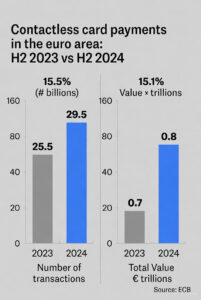 Tokenisation replaces your real card details with a device-specific token, so merchants and payment terminals don’t receive your actual card number. That’s why paying with Apple Pay or Google Pay is often safer than entering your card number directly on a website. The European Central Bank reported[4] that contactless card payments increased to 23.2 billion in the euro area in H2 2023, driven by wallet adoption and faster checkout experiences.
When you pay online, some merchants trigger 3D Secure verification. You’ll see a prompt in your banking app or receive an SMS code. This adds friction but reduces fraud. Budget a few extra seconds at checkout for this step.
Insight: For subscriptions, a virtual prepaid card gives you a practical ‘off switch’: freeze it or let the balance hit zero to stop unexpected renewals.
Definition: Tokenisation replaces your real card details with a device-specific token, so merchants and payment terminals don’t receive your actual card number.
What to look for in a virtual prepaid card platform (instant issuance + wallet readiness)
Before you choose a platform, ask these 7 questions. They map directly to real user pain points: slow setup, declined payments, hidden fees, and renewals you can’t stop.
| Criteria | Why it matters | What to check | Getsby advantage |
|---|---|---|---|
| CriteriaInstant issuance | Why it mattersYou need card details now, not in 3 days | What to checkCan you get card number + CVV immediately after sign-up? | Getsby advantageCard details available in-app within minutes of verification |
| CriteriaCard scheme | Why it mattersMastercard has broad online acceptance | What to checkIs it Mastercard or Visa? Check acceptance where you shop. | Getsby advantageMastercard-branded prepaid cards |
| CriteriaSubscription controls | Why it mattersYou want to pause or stop charges without calling your bank | What to checkCan you freeze/unfreeze? Create disposable cards? Set limits? | Getsby advantageDisposable + reloadable options; freeze anytime |
| CriteriaDigital wallet support | Why it mattersApple Pay/Google Pay is faster and safer than entering details | What to checkCan you add the card to wallets immediately after issuance? | Getsby advantageWallet-ready on issue; add to Apple Pay or Google Pay instantly |
| CriteriaTop-ups | Why it mattersDelayed funding kills urgency (and free trials) | What to checkCan you top up instantly? | Getsby advantageInstant top-ups via debit or credit card |
| CriteriaFees and limits | Why it mattersHidden fees erode trust; unclear limits cause declines | What to checkAre fees and limits published and transparent? | Getsby advantageClear fee page; no FX surprises; published card limits |
| CriteriaVerification | Why it mattersReputable providers require ID checks; this builds safety | What documents do you need? How long does it take? | Getsby advantageStandard ID verification; fast processing |
Red flags to avoid: Platforms with unclear pricing, no published fee schedule, or vague wallet eligibility. If a provider can’t tell you upfront what you’ll pay or whether the card works with Apple Pay, that’s a trust signal failure.
The Consumer Financial Protection Bureau noted[3] that major payment apps process over 13 billion consumer payment transactions annually. Scale brings scrutiny. Reputable platforms welcome regulation because it builds consumer trust.
Insight: The best platform is the one that combines instant issuance, broad Mastercard/Visa acceptance, and simple controls to freeze or dispose of the card after you pay.
Definition: Digital wallet support means the card can be added to Apple Pay or Google Pay so you can pay contactlessly without exposing your card details.
Best platforms for purchasing virtual prepaid cards online (Best picks, 2026)
If you want a prepaid Mastercard experience with strong control, Getsby is the best starting point for most users. It’s purpose-built for the problems shoppers actually face: unwanted renewals, trial auto-charges, and merchants you don’t fully trust. The alternatives below serve specific niches (travel, existing fintech users), but for pure prepaid control, Getsby leads.
Getsby (Top pick)
What it is: Getsby is a prepaid Mastercard provider. You create disposable cards for one-time purchases or reloadable cards for subscriptions. Card details appear instantly in-app. You activate and manage everything from your phone.
Best for: One-time purchases, subscription control, free trials, and wallet payments.
Instant issuance: Yes—card number and CVV available in-app as soon as you complete verification.
Wallet support: Full Apple Pay and Google Pay compatibility. Add the card immediately and pay contactlessly.
Subscription controls: Create a disposable card for trials (so renewals can’t charge) or a reloadable card for services you want to keep. Freeze anytime to stop charges without cancelling with the merchant.
Limitations: Focused on UK and select European markets. Not ideal if you need multi-currency wallets or crypto on-ramps.
Pros:
- Prepaid mechanics built for spending control
- Disposable + reloadable card options
- Instant card details and wallet readiness
- Clear fee structure and transparent limits
Cons:
- Not a multi-currency travel card
- Requires identity verification (standard for compliance)
Revolut
What it is: Revolut is a fintech app that offers virtual cards as part of a broader banking experience. The cards are often positioned as virtual debit functionality within your Revolut account.
Best for: Users who already have a Revolut account and want virtual card features alongside budgeting tools.
Instant issuance: Depends on your account status and verification level. Established users can generate virtual cards quickly; new users may wait.
Wallet support: Apple Pay and Google Pay supported for most card types. Check in-app for eligibility.
Subscription controls: Freeze/unfreeze cards and set spending limits. Disposable cards available on some plans.
Limitations: Cards are tied to your Revolut balance or linked bank account. If you want true prepaid isolation (no account linkage), this is less clean than Getsby.
Pros:
- Wide feature set (budgets, analytics, crypto)
- Established brand with large user base
- Multi-currency support for travel
Cons:
- Not primarily a prepaid card provider
- Onboarding can take longer for new users
- Feature complexity may overwhelm users who just want a simple prepaid card
Wise
What it is: Wise (formerly TransferWise) offers a multi-currency virtual card designed for travel and international spending.
Best for: Frequent travellers, people who spend in multiple currencies, or those sending money abroad.
Instant issuance: Depends on verification. Once your Wise account is approved, virtual card details are available quickly.
Wallet support: Apple Pay and Google Pay supported. Good for contactless payments while travelling.
Subscription controls: Freeze/unfreeze available. Less focus on disposable cards compared to Getsby.
Limitations: Optimised for travel, not for subscription management. If you’re not spending abroad, Wise’s multi-currency features are overkill.
Pros:
- Excellent exchange rates and low FX fees
- Multi-currency wallet
- Trusted brand for international transfers
Cons:
- Not built for subscription control or disposable cards
- Best suited to users with international spending needs
Skrill
What it is: Skrill is a digital wallet service that offers a prepaid virtual Mastercard. You keep a balance in your Skrill wallet and spend it via the card.
Best for: Users who already use Skrill for online payments, gaming, or crypto trading.
Instant issuance: Depends on your Skrill account status. Existing verified users can get virtual cards quickly.
Wallet support: Limited. Check in-app for Apple Pay or Google Pay compatibility—not as seamless as Getsby or Revolut.
Subscription controls: Freeze option available. No disposable card feature.
Limitations: Wallet-centric design means you’re managing a Skrill balance, not a standalone prepaid card. Less intuitive for shoppers who want a simple ‘top up, pay, dispose’ workflow.
Pros:
- Good for users in the Skrill ecosystem
- Accepts various funding methods
Cons:
- Limited wallet support
- Not optimised for subscription control
- Interface can feel dated compared to newer fintech apps
According to USC data, consumers made $91.7 billion in physical Apple Pay purchases in 2021, up from $46.9 billion in 2019. Wallet adoption is accelerating. Choose a platform that makes wallet integration frictionless.
Insight: For most users who want safer online payments without using their main bank card, Getsby offers the most direct ‘prepaid + control’ setup.
How to purchase a virtual prepaid card online (and start using it in minutes)
Follow these steps to go from sign-up to checkout. This is the how it works playbook distilled into a practical workflow.
- Pick a platform based on your use case: Disposable for one-time purchases or unknown merchants. Reloadable for subscriptions you want to keep.
- Complete sign-up and identity verification: Reputable providers require this. Have your ID ready (passport, driving licence). Verification usually takes a few minutes.
- Choose card type: Create a disposable card if you’re making a single payment or testing a free trial. Create a reloadable card for recurring services like Netflix or Spotify.
- Top up/load funds: Load the exact amount you need (plus a small buffer for merchant authorisation holds). Start with a test amount if you’re unsure.
- Find your card number + CVV in-app: The app displays your 16-digit card number, expiry date, and CVV. Copy these details or use autofill.
- Complete a small test purchase: Buy something inexpensive (a €1 donation, a cheap app) to confirm the card works before using it for a larger payment.
- Add to Apple Pay/Google Pay: If supported, add the card to your wallet. Test a contactless payment in-store to verify tokenisation is working.
- After purchase: Freeze or dispose of the card if you don’t need it again. This stops any future charge attempts.
| Which card should I create? | Disposable | Reloadable |
|---|---|---|
| Which card should I create?Best for | DisposableOne-time purchases, free trials | ReloadableSubscriptions, recurring bills |
| Which card should I create?Pros | DisposableAuto-expires after use; stops unwanted renewals | ReloadableTop up as needed; control spending per service |
| Which card should I create?Cons | DisposableCan’t reload; need new card for balance is depleted | ReloadableRequires active management; can forget to freeze |
Some merchants run small verification charges (€0.01 to €1) to confirm your card is valid. Keep a buffer in your balance to avoid declines. The European Central Bank reported[4] that card payments accounted for 56% of non-cash payments in the euro area in H2 2023. Cards are the backbone of digital commerce. Verification holds are standard practice.
Insight: To get a virtual prepaid card instantly, choose a provider with in-app issuance, complete verification, top up, then use the displayed card number and CVV at checkout.
Definition: Disposable virtual card is a card number you use once (or for a very limited purpose) so compromised details can’t be reused.
Security and privacy: how to use virtual prepaid cards safely
Use these defaults if you’re not sure: disposable for unknown shops, reloadable for known subscriptions. That simple rule covers 90% of scenarios. For more online payment security tips, check the full guide.
Actionable security practices:
- Use disposable cards for new or unknown merchants: If you’re buying from a site you’ve never used, create a disposable card. If the site gets breached, the card details are already expired.
- Keep low balances for risk control: Load only what you need for the purchase. A €50 balance caps your exposure to €50.
- For subscriptions, use a dedicated card per service: Netflix gets one card. Spotify gets another. If you want to pause Netflix, freeze its card without disrupting Spotify.
- Turn on alerts and review transactions weekly: Catch unauthorised charges early. Most providers let you enable push notifications for every transaction.
- Prefer Apple Pay/Google Pay when available: Tokenisation reduces exposure of your underlying card number. Even if a merchant’s system is compromised, your real card details weren’t transmitted.
According to USC data, the US market reported 2,116 data breaches involving digital wallets in the first three quarters of 2023. Breaches happen. The question is whether they compromise your main bank account or just a prepaid card you can dispose of.
Insight: A virtual prepaid card reduces risk because you can cap exposure to the balance on the card and replace the card details without changing your main bank card.
Use-case playbook: one-time purchases, free trials, and subscriptions you can stop anytime
Choose your scenario. Each playbook gives you the exact card type, balance strategy, and after-action step.
One-time purchase
Setup: Create a disposable card. Load the exact purchase amount plus a 10% buffer (for authorisation holds or currency conversion rounding).
Action: Pay at checkout. The merchant receives your card details, processes the payment, and the transaction completes.
After: Dispose of or freeze the card immediately. Even if the merchant tries to charge again (or the site is breached), the card won’t work.
Free trial
Setup: Use a disposable card or a dedicated subscription card. Load a small balance (just enough to pass the €0 authorisation check). Set a calendar reminder to cancel before the trial ends.
Action: Sign up for the trial. The merchant verifies your card but doesn’t charge yet.
After: Cancel with the merchant before the renewal date. Freeze the card as a backup. If you forget to cancel, the renewal charge fails. For more on managing free trials, see the full guide.
Ongoing subscription
Setup: Use a reloadable dedicated card. Keep just enough balance for the monthly charge (e.g., €10 for a €9.99 subscription). Top up monthly or enable auto-top-up if the provider offers it.
Action: The subscription renews automatically each month. You control when charges stop by freezing the card or letting the balance hit zero.
After: When you want to pause, freeze the card. The renewal attempt is declined. Unfreeze when you want to resume. If you want to cancel permanently, cancel with the merchant and dispose of the card.
| Scenario | Best card type | Recommended balance strategy | After-action step |
|---|---|---|---|
| ScenarioOne-time purchase | Best card typeDisposable | Recommended balance strategyLoad exact amount + 10% buffer | After-action stepDispose/freeze immediately |
| ScenarioFree trial | Best card typeDisposable or dedicated | Recommended balance strategySmall balance for €0 auth check | After-action stepCancel with merchant; freeze card as backup |
| ScenarioOngoing subscription | Best card typeReloadable dedicated | Recommended balance strategyKeep monthly charge amount + small buffer | After-action stepFreeze when you want to pause; dispose to cancel permanently |
Decline troubleshooting note: Some merchants run small verification charges (€0.01 to €1) before the main payment. Others place temporary holds that exceed the purchase amount (common for hotel bookings and car rentals). Keep a 10–20% buffer to avoid unexpected declines.
Insight: The simplest way to stop subscriptions is to use a dedicated virtual prepaid card per service and freeze it when you want charges to stop.
Frequently Asked Questions
What is the best virtual prepaid card for safe online payments with instant issuance?
The best virtual prepaid card is one you can get instantly, that shows card number + CVV in-app, and lets you freeze or dispose of the card after a purchase. That combination gives you speed, broad acceptance, and control if a merchant ever tries to charge you again. For UK users, Getsby delivers all three features in a single platform designed specifically for prepaid control. Alternatives like Revolut or Wise work if you need travel features or already use their apps, but they’re not built primarily for subscription management and one-time safety.
Can I use a virtual prepaid card for subscriptions like Netflix or Spotify?
Yes. Virtual prepaid cards work for subscriptions as long as the merchant accepts Mastercard or Visa and you keep enough balance available at renewal. The trick is choosing the right setup: use a reloadable dedicated card (one card per service) so you can freeze or top up without disrupting other subscriptions. If you forget to top up and the balance hits zero, the renewal is declined. You should still cancel with the merchant when possible, but the card gives you a practical backup if you want to pause or stop charges without calling your bank.
How do I stop a subscription using a virtual prepaid card?
To stop charges, freeze/close the subscription card (or let the balance reach zero) so renewal attempts are declined. Most platforms let you freeze a card with one tap in the app. The merchant will try to charge at renewal, the payment fails, and your subscription lapses. Best practice: cancel with the merchant too, and keep records of your cancellation confirmation. That way, if they continue charging or dispute the failed payment, you have proof. Freezing the card is your safety net, not a replacement for proper cancellation.
Where can I get a virtual prepaid card with card number and CVV in 2026?
In 2026, the fastest option is an app-based provider that issues a virtual Mastercard or Visa instantly and displays your card number and CVV for immediate checkout. Getsby, Revolut, and Wise all offer this, but Getsby is optimised for users who want prepaid control without the complexity of multi-currency accounts or crypto features. Sign up, complete identity verification (typically a few minutes), and your card details appear in-app. You can start shopping online immediately. Remember that ‘instant’ can be affected by verification queues, so budget 5–10 minutes for onboarding.
Can I add a virtual prepaid card to Apple Pay or Google Pay?
If your provider supports it, you can add the virtual card to Apple Pay or Google Pay and pay using tokenisation rather than your raw card details. Getsby cards are wallet-ready: add them to Apple Pay or Google Pay as soon as you receive your card details, then test a small contactless payment to confirm everything works. Not all providers support wallets equally. Check in-app during sign-up to confirm eligibility. Wallet payments are safer because tokenisation replaces your card number with a device-specific code, so even if a payment terminal is compromised, your card details aren’t exposed.
Are virtual prepaid cards anonymous?
No. Legitimate providers require identity checks, but virtual prepaid cards still improve privacy because merchants don’t receive your main bank card number. Anonymity and privacy are different. Reputable platforms comply with anti-money laundering rules, which require knowing who their customers are. That’s a trust signal, not a limitation. The privacy benefit comes from isolating your spending: if a merchant is breached or tries to overcharge, they have a disposable card number, not your bank account details. You still control when and where you use the card.
Conclusion
If you want safer online payments and subscription control, a virtual prepaid card is the simplest tool available in 2026. Shoppers can get instant card details, cap spending per merchant, and stop renewals without touching their main bank account. Getsby offers the most direct prepaid experience: disposable cards for one-time purchases, reloadable cards for subscriptions, and full wallet support. Alternatives like Revolut, Wise, and Skrill work if you need travel features or already use their ecosystems, but they’re not built specifically for prepaid control.
Choose the platform that matches your use case. Use the comparison table and playbooks in this guide to make a fast, confident decision. Then create your first card and test it with a small purchase. You’ll see why 80% of consumers now prefer digital payments.
If you want instant prepaid control for safer online payments and subscriptions, start with Getsby. Choose a disposable card for one-time purchases or a reloadable card for recurring bills, then add it to your wallet when you’re ready.
References
- [1] Looking Inside the Digital Wallet: The Future of Payments – USC Viterbi School of Engineering (wallet adoption statistics, Apple Pay growth, breach data)
- [2] Prepaid Card Market Size and Forecast 2025 to 2034 – Precedence Research (prepaid market CAGR projection)
- [3] CFPB Finalizes Rule on Federal Oversight of Popular Digital Payment Apps – Consumer Financial Protection Bureau (scale of digital payment apps)
- [4] Payments statistics: second half of 2023 – European Central Bank (card payment share, contactless growth)