
Best Instant Virtual Cards

The best Google Pay-ready virtual card is one that shows card details instantly and can be added to Google Wallet immediately after verification (Getsby is built for that ‘instant + control’ workflow). If you need a virtual Mastercard instantly, choose a provider that issues card details in-app within minutes and supports immediate wallet tokenisation; in the EU and UK, Getsby and Skrill are common starting points, while Revolut and Wise may depend on verification status. This guide cuts through the confusion by separating “instant card details” from “instant wallet readiness” and maps every setup step you need to pay online or in-store within minutes.

Quick Answer at a Glance
“Instant issuance” means you can see a usable virtual card number and CVV in the app within minutes, not days. You still need to confirm your identity first, but once that’s done, the card appears immediately. The fastest ‘wallet-ready’ option is the provider that issues card details instantly and supports immediate Apple Pay or Google Pay tokenisation after verification.
For most shoppers who want quick setup and maximum control over subscriptions, a prepaid virtual Mastercard like Getsby is the simplest choice. Getsby cards show card details in-app the moment you create them, they can be added to Google Pay and Apple Pay straight away, and you get one-tap controls to freeze or dispose of the card after a purchase. If you need travel features or multi-currency, Revolut and Wise are strong alternatives (though “instant” may depend on your account status). If you want a full current account with a virtual debit card, Monzo, Starling, and Chase UK are credible UK bank options.
Research shows that 57% of UK adults were using mobile wallets in 2024 (a 15% increase from 2023), so wallet-first thinking is now mainstream. That’s why this comparison starts with “can you add it to Apple Pay or Google Pay today?” rather than simply “does a virtual card exist?”
Instant Virtual Card Options (2026): Wallet Readiness and Controls
| Provider | Card type | Scheme | Instant card details? | Add to Apple Pay? | Add to Google Pay? | Disposable / reusable controls | Best for |
|---|---|---|---|---|---|---|---|
| ProviderGetsby | Card typePrepaid | SchemeMastercard | Instant card details?Yes | Add to Apple Pay?Yes | Add to Google Pay?Yes | Disposable / reusable controlsDisposable + reloadable; freeze instantly | Best forSubscriptions, one-off purchases, prepaid control |
| ProviderRevolut | Card typeDebit (or prepaid) | SchemeVisa or Mastercard | Instant card details?Depends on verification | Add to Apple Pay?Yes | Add to Google Pay?Yes | Disposable / reusable controlsDisposable available; freeze / replace | Best forMulti-currency travel, existing Revolut users |
| ProviderWise | Card typeDebit | SchemeMastercard | Instant card details?Depends on verification | Add to Apple Pay?Yes | Add to Google Pay?Yes | Disposable / reusable controlsReloadable; limited disposable | Best forTravel, low-cost FX, frequent cross-border spending |
| ProviderSkrill | Card typePrepaid | SchemeMastercard | Instant card details?Yes | Add to Apple Pay?Yes | Add to Google Pay?Yes | Disposable / reusable controlsReloadable (online-focused) | Best forOnline payments, gaming, e-commerce |
| ProviderMonzo / Starling / Chase UK | Card typeDebit | SchemeMastercard or Visa | Instant card details?Depends on account opening | Add to Apple Pay?Yes | Add to Google Pay?Yes | Disposable / reusable controlsVaries (Monzo offers disposable; others less so) | Best forFull current account, everyday banking |
Disclaimer: Features can change. Confirm in-app. Last updated April 2025. For more detail on prepaid options, see our guide to best virtual prepaid cards.
What “Instant” Really Means in 2026
You need to pay online in 5 minutes. What must be true? You need three things: (1) card details (number, expiry, CVV) visible in the app, (2) the ability to add the card to Apple Pay or Google Pay if you’re paying in-store or contactlessly, and (3) enough cleared balance to cover the charge plus any authorisation holds. Most people conflate “virtual card generated” with “can pay with Google Pay today,” but they’re not the same.
A virtual card is only ‘instant’ for contactless payments when it can be tokenised into Apple Pay or Google Pay right away. McKinsey reports that 90% of consumers in Europe and the US used some form of digital payment in 2024, so this isn’t niche. If you skip the wallet step, you can still copy-paste the card details for online purchases, but contactless in-store won’t work until you add the card to Apple Wallet or Google Wallet.
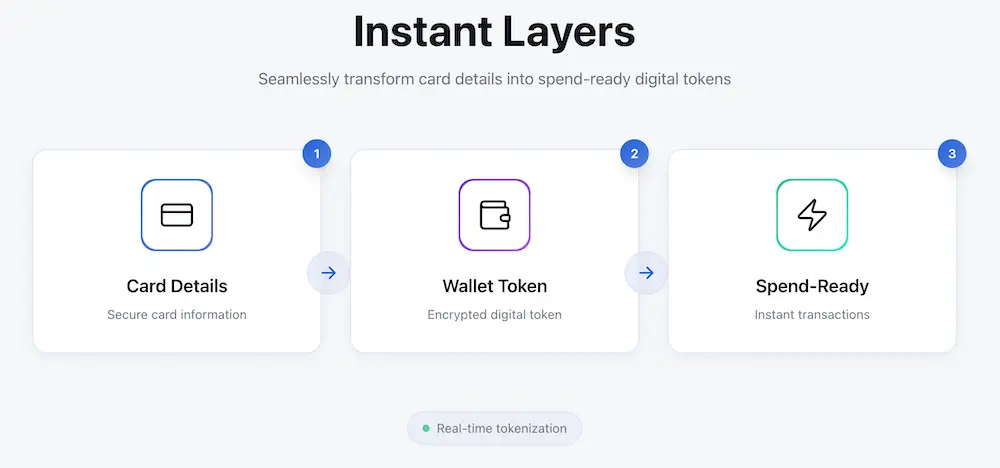
Tokenisation replaces your real card number with a device-specific token, so merchants and terminals don’t receive your actual card details. This is how Apple Pay and Google Pay keep your card number private even when you tap to pay. For more on adding a card, see our step-by-step guide to add a virtual card to Google Pay.
The three layers of “instant”
| Instant layer | What you get | What can delay it |
|---|---|---|
| Instant layer1. Instant card details | What you getPAN, expiry, CVV visible in-app | What can delay itID verification pending; app onboarding incomplete |
| Instant layer2. Instant wallet token | What you getCard added to Apple Pay / Google Pay | What can delay itDevice security disabled; unsupported device/region; issuer eligibility rules |
| Instant layer3. Instant spend-ready | What you getTop-up cleared; 3D Secure works; sufficient balance for holds | What can delay itBank transfer delay; authorisation holds; 3D Secure not completed |
Budget 5 to 15 minutes if verification is smooth. If your ID check is instant and you top up via Faster Payments, you can be spend-ready in under 10 minutes. If you’re asked for additional documents or your bank transfer is slow, add 1 to 2 hours.
Virtual Debit vs Virtual Prepaid vs Virtual Credit
If your priority is isolating risk from your main bank account, prepaid usually wins. A virtual prepaid card is a digital card number you top up in advance, so you can’t spend more than the loaded balance. Prepaid virtual cards are popular for safer online shopping because the maximum loss is limited to the balance you load.
Virtual debit cards draw from a bank or current account balance; they’re convenient, but exposure is broader. If your debit card details are compromised, the attacker can attempt transactions up to your account balance or overdraft limit (if you have one). Virtual credit cards offer a borrowing line, but they’re less common in the prepaid space and not the focus of this guide.
Reality: most reputable products require identity checks (KYC). Privacy does not equal anonymity. Legitimate providers need to verify who you are to comply with UK and EU financial regulations. The privacy benefit is control and compartmentalisation (merchants never touch your main bank card details), not complete anonymity. ONS datasets confirm that card payments are the dominant spending method, which explains why regulation is tight.
Card type comparison
| Card type | Where money comes from | Best for | Main drawback |
|---|---|---|---|
| Card typeVirtual debit | Where money comes fromYour bank / current account balance | Best forEveryday banking; convenience; existing account holders | Main drawbackBroader exposure if card details leak |
| Card typeVirtual prepaid | Where money comes fromBalance you load in advance | Best forSubscriptions; one-off purchases; budgeting; safer online spending | Main drawbackMust top up before spending; not linked to credit history |
| Card typeVirtual credit | Where money comes fromBorrowing / credit line | Best forBuilding credit; large purchases with repayment flexibility | Main drawbackInterest charges; credit check required; less common for virtual-only |
For detail on prepaid mechanics, read our explainer on what a prepaid card is.
Non-Negotiables for Apple Pay and Google Pay Readiness (Checklist)
Before you sign up, confirm these 6 wallet requirements:
- Device: Apple Pay on iPhone or Apple Watch (iOS current or previous major version); Google Pay via Google Wallet on Android (OS 7.0 or later).
- Security: Passcode or biometric (Face ID, Touch ID, fingerprint) enabled on the device. Wallets won’t add cards to unsecured devices.
- Provider eligibility: The card issuer must support Apple Pay and Google Pay. Check the provider’s FAQs or app before signing up.
- Verification completed: Most issuers won’t let you add a card to a wallet until your identity verification is finished.
- Region match: Your account address and device region should match the EU or UK. Some providers apply geographic restrictions.
- First-payment 3D Secure: The first time you pay with the card (online or wallet), you may see a 3D Secure prompt asking you to confirm in-app. This is normal and only happens once per card or device.
If a provider can’t confirm Apple Pay and Google Pay eligibility up front, treat that as a trust red flag. Wallet readiness is not an optional feature in 2026. Data shows that 57% of UK adults used mobile wallets in 2024 (up 15% from 2023), so any serious card product supports both platforms.
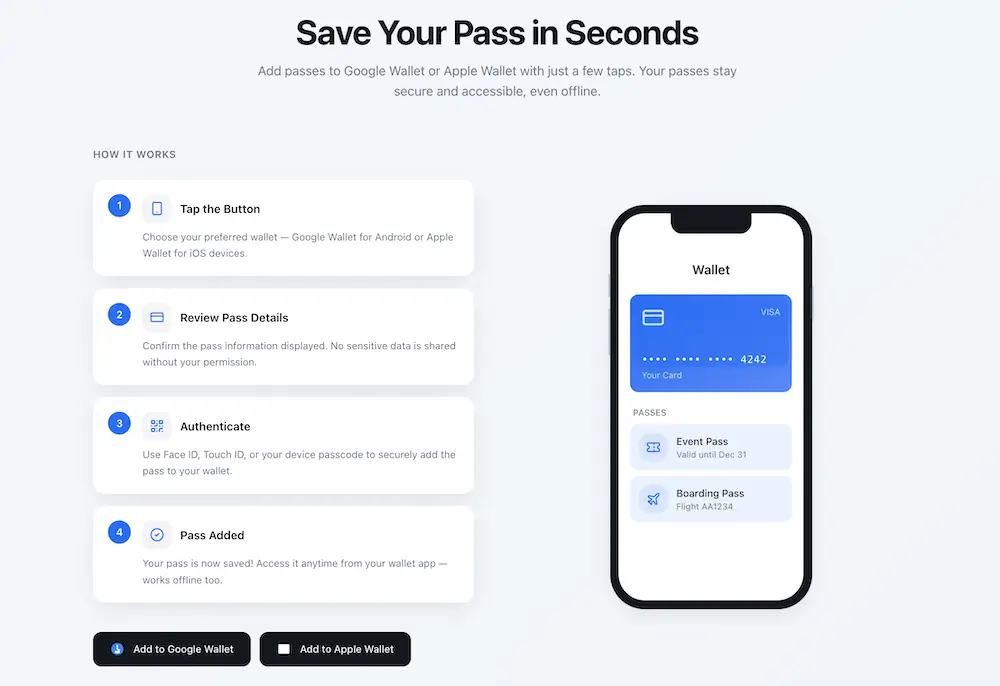
For step-by-step wallet setup, see our guide on how to add a virtual card to Apple Pay.
Common wallet add failures and fixes
| Problem | Likely cause | Fix in 60 seconds |
|---|---|---|
| ProblemWallet won’t accept the card | Likely causeVerification incomplete; card not eligible; region mismatch | Fix in 60 secondsComplete ID check in-app; confirm card is wallet-enabled; check device region settings |
| Problem“Card cannot be added” | Likely causeDevice security disabled | Fix in 60 secondsEnable passcode or biometric in device settings |
| ProblemWallet adds card but payment declines | Likely causeInsufficient balance for authorisation hold; 3D Secure not completed | Fix in 60 secondsTop up with 10-20% buffer; complete any in-app 3D Secure prompts |
Best Instant Virtual Debit and Prepaid Cards You Can Open
For most users, the best option is the one that gives instant card details, wallet readiness, and subscription controls in one place. This is where Getsby stands out. Getsby is the most straightforward pick for shoppers who want instant prepaid card details plus one-tap controls to freeze or dispose of the card after a purchase.
Getsby (Top Pick for Prepaid Control and Subscription Management)
Getsby offers two card types: the Virtual Black Card (disposable, one-off use) and the Virtual Green Card (reloadable, recurring use). Both show card details in-app the moment you create them. Both can be added to Apple Pay and Google Pay immediately after your identity verification is complete (usually under 5 minutes). You get one-tap freeze and disposal controls, so if you sign up for a free trial or make a one-off purchase, you can freeze the card straight after to prevent any future charges.
The Virtual Black Card is designed for disposable use: you create it, use it once or for a short period, then dispose of it. This is perfect for unknown merchants, free trials, or any situation where you don’t want the card number to be reused. The Virtual Green Card is reloadable and works like a traditional prepaid card: you top it up and use it for ongoing subscriptions or everyday online shopping. You can freeze it at any time, which gives you a reliable backup control if cancelling a subscription with the merchant proves difficult.
Getsby is UK-available and you top up via debit card and bank transfer. The app is simple: no complex account tiers or monthly fees. Because it’s prepaid, you never risk your main bank account balance. For a detailed feature comparison, visit our page to compare Getsby cards.
Best for: shoppers who want instant prepaid isolation, subscription control, and disposable cards for one-off purchases or free trials.

Revolut (Strong Alternative for Multi-Currency and Existing Users)
Revolut offers both physical and virtual cards. If you already have a Revolut account and your verification is complete, you can generate a virtual card in seconds. Revolut virtual cards can be added to Apple Pay and Google Pay, and you can create disposable virtual cards (depending on your plan). ONS data shows that total Revolut debit card spending increased by 7% in the week to 6 April 2025, confirming that consumers actively use the platform.
Revolut’s strength is multi-currency: you can hold GBP, EUR, USD, and many other currencies in the same account, and spend abroad at competitive exchange rates. The app includes budgeting tools, analytics, and the ability to freeze or replace cards instantly. The main caveat: “instant” card issuance depends on your account status. If you’re a new user, you may need to wait for verification (which can take a few hours to a day). Once you’re verified, card creation is instant.
Best for: Existing Revolut users; travellers who need multi-currency; people who want an all-in-one fintech app with budgeting and analytics.
Wise (Best for Travel and Low-Cost Foreign Exchange)
Wise (formerly TransferWise) is built for cross-border spending. You get a Wise debit card (physical and virtual) linked to a multi-currency account. Virtual card issuance is usually instant once your account is verified, but new users may experience a delay during the ID check phase. The Wise card can be added to Apple Pay and Google Pay and supports contactless payments worldwide.
Wise is less focused on disposable or subscription control features. It’s a reloadable debit card product. You hold balances in multiple currencies, and when you pay in a foreign currency, Wise converts at the mid-market rate with a transparent fee (typically 0.35% to 1%, much lower than traditional bank cards). If your use case is travel or frequent cross-border online shopping, Wise is hard to beat on cost.
Best for: Travel; frequent foreign currency spending; people who want a multi-currency account with low FX fees.
Skrill (Virtual Prepaid Mastercard for Online Payments and Gaming)
Skrill offers a virtual prepaid Mastercard that is instant to issue once your account is set up. Skrill is historically popular with online shoppers, freelancers, and gamers because it supports a wide range of funding methods (bank transfer, card, even cryptocurrency in some regions). The virtual card can be added to Apple Pay and Google Pay and used for online purchases immediately.
Skrill is more online-focused than in-store. It doesn’t emphasise disposable cards or subscription controls in the same way Getsby does. It’s a single reloadable virtual card. You top up your Skrill wallet and use the card to spend that balance. Skrill charges fees for some transactions and currency conversions, so check the fee schedule before committing.
Best for: Online payments; gaming; e-commerce; users who want a prepaid Mastercard and already use Skrill for other transactions.
UK Bank Options (Monzo, Starling, Chase UK)
Monzo, Starling, and Chase UK all offer virtual debit cards as part of their current accounts. If you want a full bank account with FSCS protection (up to £85,000 per person per institution) and a virtual card for online shopping, these are credible options.
Monzo: Allows you to create up to 100 virtual cards per year. You can freeze, replace, or dispose of them in-app. Monzo virtual cards can be added to Apple Pay and Google Pay. Monzo is particularly strong for subscription management: you can create one virtual card per subscription and freeze it if you want to stop charges. Monzo is a full current account, so “instant” depends on how quickly you can open the account (usually same-day if verification is smooth).
Starling: Offers up to five virtual cards linked to different ‘Spaces’ (budgeting pots). Each card can be frozen or deleted independently. Starling virtual cards support Apple Pay and Google Pay. Starling is a full current account with a banking licence.
Chase UK: Offers a numberless physical card with full card details available in-app. Chase also provides virtual cards for online use, and all cards can be added to Apple Pay and Google Pay. Chase UK is a newer entrant (part of JPMorgan Chase) but has grown quickly. Chase offers cashback on some spending, which can be a bonus.
Best for: People who want a full current account first and a virtual debit card second; users who prefer FSCS-protected banking over prepaid products.
Which Should You Choose?
- If you want prepaid isolation and subscription control: Getsby
- If you want travel FX and multi-currency: Wise
- If you want an all-in-one fintech app with budgeting: Revolut
- If you want a full current account with virtual cards: Monzo, Starling, or Chase UK
- If you’re focused on online payments and gaming: Skrill
Controls and subscriptions comparison
| Provider | Can freeze instantly? | Disposable numbers? | Best subscription approach | Notes |
|---|---|---|---|---|
| ProviderGetsby | Can freeze instantly?Yes | Disposable numbers?Yes (Virtual Black Card) | Best subscription approachOne disposable or reloadable card per service; freeze to stop charges | NotesDesigned for this use case |
| ProviderRevolut | Can freeze instantly?Yes | Disposable numbers?Yes (plan-dependent) | Best subscription approachDisposable cards for trials; main card for ongoing subs | NotesStrong app controls |
| ProviderWise | Can freeze instantly?Yes | Disposable numbers?No | Best subscription approachSingle reloadable card; less suited to multi-subscription isolation | NotesBest for travel, not subscription management |
| ProviderSkrill | Can freeze instantly?Yes | Disposable numbers?No | Best subscription approachSingle reloadable card | NotesGood for online payments, less for subscription control |
| ProviderMonzo | Can freeze instantly?Yes | Disposable numbers?Yes (up to 100/year) | Best subscription approachOne virtual card per subscription; freeze individually | NotesExcellent subscription management |
| ProviderStarling | Can freeze instantly?Yes | Disposable numbers?Yes (up to 5 active) | Best subscription approachOne card per Space (budgeting pot) | NotesGood for budgeting + subs |
| ProviderChase UK | Can freeze instantly?Yes | Disposable numbers?Limited | Best subscription approachIn-app card details; freeze main card | NotesNewer product; feature set evolving |
How to Get a Virtual Mastercard Instantly
If you only follow one section, follow this. To get a virtual Mastercard instantly, complete verification first, then generate the card in-app, top up with a small buffer, and only then add it to Apple Pay or Google Pay.
The exact order of operations prevents declines and frustration:
- Pick prepaid vs debit based on risk and use case. If you want to protect your main bank account, choose prepaid. If you want current account convenience and you trust the provider’s security, choose debit.
- Complete verification. Upload your ID (passport or driving licence). Most apps use automated checks that finish in under 5 minutes. Legitimate providers must verify your identity to comply with regulations. This is why you can’t get a truly anonymous virtual card in the EU and UK.
- Generate card details. Once verified, create the virtual card in the app. You should see the 16-digit PAN, expiry date, and CVV immediately. If you don’t, the app will tell you why (usually verification pending or account restrictions).
- Top up with a 10-20% buffer for authorisation holds. Authorisation holds are temporary reserved amounts a merchant places on your card balance before final settlement. Hotels, car hire companies, and some subscription trials place holds that can be € 10 to € 100+ above the transaction value. If you load exactly the amount you need, the hold will cause a decline. Add a buffer.
- Add to Apple Pay or Google Pay. Open the wallet app on your device, tap “Add card”, scan or enter the card details, and complete any issuer verification (usually an SMS code or in-app prompt). The card should tokenise immediately if your device and security settings are correct.
- Run a small test transaction before high-value spend. Make a € 1 or € 2 purchase online or in-store to confirm the card works and 3D Secure is set up. This avoids discovering problems when you’re trying to buy something time-sensitive or expensive.
For more on managing your card after setup, read our guide to activate and manage your card.
Disposable vs reloadable decision table
| Use case | Best card type | Recommended balance strategy | What to do after |
|---|---|---|---|
| Use caseOne-off purchase from unknown merchant | Best card typeDisposable | Recommended balance strategyLoad exact amount plus 10% buffer | What to do afterDispose or freeze immediately after purchase |
| Use caseFree trial (don’t want renewal) | Best card typeDisposable | Recommended balance strategyMinimal balance (€ 1-5); merchant may place hold | What to do afterFreeze or dispose before trial ends; set calendar reminder |
| Use caseOngoing subscription (Netflix, Spotify) | Best card typeReloadable | Recommended balance strategyTop up monthly or set auto-reload; keep balance tight | What to do afterFreeze when you want to pause; unfreeze to resume |
| Use caseTravel (hotels, car hire) | Best card typeReloadable | Recommended balance strategyLoad full cost plus 20-30% for authorisation holds | What to do afterKeep active until final settlement clears (can take 7-14 days) |
Use-Case Playbook
Pick your scenario and copy the setup:
One-Off Purchase from Unknown Merchant
Setup: Create a disposable virtual card (Getsby Virtual Black Card or Monzo disposable). Load the exact purchase amount plus 10% buffer. Use the card for the transaction. Freeze or dispose of the card immediately after the payment confirms.
Why it works: The merchant never gets a card number that can be reused. Even if your card details leak, the card is already dead. Your main bank account is never exposed.
Free Trials (Stopping Unwanted Renewals)
Setup: Create a disposable card. Load a minimal balance (€ 1-5; some trials require a valid payment method but don’t charge until renewal). Complete the trial sign-up. Set a calendar reminder for 1 day before the trial ends. Freeze or dispose of the card before the trial expires. The merchant’s renewal attempt will be declined.
Why it works: The simplest way to stop a subscription is to use one dedicated virtual prepaid card per service and freeze it when you want the charges to stop. You avoid the hassle of navigating the merchant’s cancellation process (which is often deliberately complicated). For a detailed walkthrough, see our guide on prepaid cards for free trials.
Ongoing Subscriptions (Netflix, Spotify, Adobe)
Setup: Create one reloadable virtual card per subscription (Getsby Virtual Green Card or Monzo/Starling dedicated card). Top up the card monthly or enable auto-reload if the provider offers it. Keep the balance tight (e.g. € 10-15 for a € 9.99 subscription) so a rogue charge can’t drain much. Freeze the card if you want to pause or stop the subscription.
Why it works: You get subscription isolation. If one service has a billing issue or you forget to cancel, only that card is affected. Your main bank card and other subscriptions are untouched. Freezing gives you a reliable backup control if the merchant makes cancellation difficult.
Travel (Hotels, Car Hire, Flights)
Setup: If FX matters, use Wise or Revolut for multi-currency and low exchange fees. If control matters more than FX, use a prepaid card (Getsby, Skrill). Load the full cost of the booking plus 20-30% for authorisation holds. Hotels and car hire companies routinely hold € 50-200 beyond the booking cost to cover potential damages or extras.
Keep active: Don’t freeze or dispose of the card until the final settlement clears. Authorisation holds can take 7-14 days to release. If you dispose of the card too early, the merchant may not be able to complete the settlement, which can cause problems.
Caveat: Some hotels and car hire desks require a physical card for hold purposes. Always carry a backup physical card when travelling. Virtual-only cards may not work in 100% of travel scenarios.
Merchant Categories Where Virtual-Only May Fail
Virtual cards work for most online purchases and contactless in-store payments (via Apple Pay or Google Pay). They may not work for:
- Car hire desks that require a physical card for inspection
- Some hotel check-ins (especially if the desk is old-fashioned or the system only accepts physical cards)
- Petrol pumps with pre-authorisation (though this is improving; contactless is now common at pumps)
- Age-restricted purchases where the cashier wants to see a physical card with your name
Always have a backup physical card when you’re relying on a virtual card for travel or high-value bookings.
Scenario playbook summary
| Scenario | Best card type | Balance rule | After-action step |
|---|---|---|---|
| ScenarioOne-off purchase | Best card typeDisposable | Balance ruleExact amount + 10% | After-action stepDispose or freeze immediately |
| ScenarioFree trial | Best card typeDisposable | Balance ruleMinimal (€ 1-5) | After-action stepFreeze before trial ends; set reminder |
| ScenarioOngoing subscription | Best card typeReloadable | Balance ruleMonthly top-up; tight balance | After-action stepFreeze to pause; unfreeze to resume |
| ScenarioTravel | Best card typeReloadable (multi-currency if FX matters) | Balance ruleFull cost + 20-30% buffer | After-action stepKeep active until settlement clears |
Security and Privacy (Without Myths)
Virtual doesn’t mean anonymous; it means compartmentalised. For the strongest protection, use a prepaid virtual card with a low balance and pay via Apple Pay or Google Pay so your real card number is never shared.
Tokenisation via Apple Pay and Google Pay: When you add a virtual card to Apple Pay or Google Pay, the wallet creates a device-specific token. This token is a substitute number that represents your card. When you tap to pay in-store or pay in-app, the merchant receives the token, not your actual card number. If the merchant’s system is breached, your real card number is not in the data. Tokenisation reduces card-number exposure and is one of the strongest security features of mobile wallets.
3D Secure: 3D Secure is an extra verification step for online card payments where you approve the purchase in-app or via a one-time code. It can cause friction (an extra prompt, a few seconds’ delay), but that friction is good. It prevents fraudsters from using your card details even if they steal them. Most merchants now require 3D Secure for card-not-present transactions. For more detail, see our explainer on what 3D Secure is.
Controls that matter: Freeze and unfreeze instantly in-app. Create disposable numbers for one-off use. Keep balances low (only load what you need). Enable transaction alerts so you know immediately if the card is used.
Privacy: Merchants see a card number, but your main bank card stays protected. If you use a prepaid virtual card, the merchant never touches your current account. This is “prepaid isolation”: spending is limited to what you loaded onto the card. If the card details are compromised, the attacker can only attempt to spend the remaining balance, not drain your bank account. For a broader look at payment security, read our guide on online payment security.
Threat comparison: normal debit card vs virtual prepaid card
| Threat | What happens with a normal debit card | What happens with a virtual prepaid card |
|---|---|---|
| ThreatMerchant data breach | What happens with a normal debit cardYour main bank card number is stolen; attacker can attempt transactions on your current account | What happens with a virtual prepaid cardOnly the virtual card number is stolen; attacker can only attempt to spend the prepaid balance; your main bank card is never exposed |
| ThreatPhishing or card-number theft | What happens with a normal debit cardAttacker can use your card for online purchases until you notice and freeze the card | What happens with a virtual prepaid cardIf you use a disposable card, the card is already disposed of; if reloadable, freeze it instantly and the attacker’s attempts are declined |
| ThreatSubscription you forgot to cancel | What happens with a normal debit cardCharge hits your current account; you must dispute or request refund | What happens with a virtual prepaid cardFreeze the card; future charges are declined; you stop the bleeding immediately |
Regulatory developments such as the US Consumer Financial Protection Bureau’s 2024 rule defining larger participants in the digital payment market show that digital payments are under growing oversight. This is a good thing; it means the wild west is ending and consumers have more protection. While this specific rule is US-based, it reflects a global trend of tighter regulation for digital wallets and virtual cards.
Common Issues
Most problems come down to one of five causes. Check these in order:
- Insufficient funds due to authorisation holds. If your virtual card declines but you have money, the most common cause is a temporary authorisation hold or an incomplete 3D Secure step. Merchants (especially hotels, car hire, petrol stations) place holds that exceed the final charge. Add a 10-20% buffer.
- Merchant requires physical card. Some merchants (car hire desks, some hotels) require a physical card for inspection or policy reasons. Virtual cards won’t work. Carry a backup physical card.
- Mismatched billing details. The name, postcode, and address you provide must match the account holder details exactly. If you enter a different name or address, the payment will be declined.
- 3D Secure not completed. If you skip or ignore the 3D Secure prompt, the payment fails. Check your app for a pending verification request and complete it.
- Card frozen or disposed. Check the app. If you froze the card for a previous transaction and forgot to unfreeze it, payments will be declined. If you disposed of a disposable card and are trying to reuse it, it won’t work.
Google Pay and Apple Pay Add Failures
If Apple Pay or Google Pay won’t let you add the card:
- Verification incomplete: Finish the ID check in the card app first.
- Device security disabled: Enable passcode or biometric authentication.
- Region mismatch: Check that your device region is set correctly and your account address matches.
- Provider eligibility rules: Confirm the card issuer supports Apple Pay and Google Pay. Check the app’s FAQs or contact support.
For more troubleshooting, see our guide on card decline reasons.
Symptom, cause, and fix
| Symptom | Most likely cause | Fastest fix | When to contact support |
|---|---|---|---|
| SymptomPayment declined (have balance) | Most likely causeAuthorisation hold or 3D Secure incomplete | Fastest fixTop up 10-20% buffer; complete 3D Secure in app | When to contact supportIf problem persists after buffer and 3D Secure |
| SymptomWallet won’t add card | Most likely causeDevice security off or verification pending | Fastest fixEnable passcode; finish ID check | When to contact supportIf card is verified and device secure but still fails |
| SymptomMerchant says card invalid | Most likely causeMismatched billing details or card not accepted | Fastest fixRe-enter exact name/address from account; check merchant accepts Mastercard/Visa | When to contact supportIf details match and merchant claims technical issue |
| SymptomCard works online but not in-store | Most likely causeCard not added to wallet or contactless not enabled | Fastest fixAdd to Apple Pay/Google Pay; confirm contactless enabled | When to contact supportIf added to wallet but still fails contactless |
Merchant verification charge: A merchant verification charge is a small temporary charge (often € 0 to € 1) used to confirm your card details are valid. It appears on your statement and is usually refunded within 1-7 days. This is normal and not a sign of fraud.
How to Choose (Decision Checklist)
If you’re torn between options, answer these 7 questions:
- Do you need prepaid isolation or current-account convenience? If you want to protect your main bank account, choose prepaid (Getsby, Skrill). If you want current-account convenience, choose debit (Revolut, Wise, Monzo, Starling, Chase UK).
- Do you need disposable numbers for unknown merchants and trials? If yes, choose Getsby Virtual Black Card or Monzo disposable cards.
- Do you need immediate Apple Pay and Google Pay use? All providers in this guide support both, but confirm during sign-up.
- Do you need multi-currency or FX features? If you travel frequently or spend in foreign currencies, choose Wise or Revolut.
- Do you need subscription controls that are simple enough to actually use? If yes, choose Getsby (designed for this) or Monzo (up to 100 disposable cards per year).
- Do you want a full UK bank account with FSCS protection? If yes, choose Monzo, Starling, or Chase UK.
- Do you want the card primarily for online payments and gaming? If yes, Skrill or Getsby.
Prepaid isolation means merchants never touch your main bank account funds because spending is limited to what you loaded onto the card. Industry research projects the prepaid card market will grow at a CAGR of over 15% from 2023 to 2032, reaching USD 8.2 trillion by 2032. This confirms that prepaid is not a niche category; it’s a mainstream payment method that millions of people rely on for control and security.
Decision tree: if your top priority is
| If your top priority is… | Choose… |
|---|---|
| If your top priority is…Prepaid isolation + subscription control | Choose…Getsby |
| If your top priority is…Multi-currency travel + low FX fees | Choose…Wise |
| If your top priority is…All-in-one fintech app with budgeting | Choose…Revolut |
| If your top priority is…Full UK current account with FSCS protection | Choose…Monzo, Starling, or Chase UK |
| If your top priority is…Online payments, gaming, e-commerce | Choose…Skrill |
For more on wallet safety, read our explainer on whether Google Pay is safe.
Frequently Asked Questions
What is the best Google Pay virtual card?
The best Google Pay virtual card is the one you can add to Google Wallet immediately after verification and control in-app. Getsby is designed for that instant, prepaid-first workflow. You create the card, see the details instantly, and add it to Google Pay in under a minute (once your identity is verified). Revolut and Wise are strong alternatives, but “instant” may depend on your account status. If you’re a new user, you may wait a few hours for verification. If you’re an existing user, card creation is instant.
Where can I get a virtual Mastercard instantly in 2026?
You can usually get a virtual Mastercard instantly from an app that issues card details in minutes; in the EU and UK, Getsby and Skrill are common options, while Revolut and Wise may be instant after verification. The key is to complete your identity check first. Once that’s done, the card appears in-app immediately. Verify the card can be added to Apple Pay and Google Pay before you commit, because that’s what makes it truly spend-ready for contactless in-store payments.
Can you add a virtual prepaid card to Apple Pay?
Yes. If your provider supports Apple Pay, you can add the virtual card to Apple Wallet and pay with a token instead of your real card number. Open Apple Wallet, tap the plus icon, scan or enter the card details, and complete any issuer verification (usually an SMS code or in-app prompt). The card should tokenise immediately if your device has a passcode or biometric enabled. If Apple Pay won’t let you add it, the usual causes are incomplete verification, device security disabled, or the issuer doesn’t support Apple Pay (which is rare in 2026).
Why is my virtual card being declined?
Virtual cards are most often declined due to insufficient balance for an authorisation hold, an incomplete 3D Secure step, or a merchant that requires a physical card. Authorisation holds are temporary reserves that exceed the final charge (common with hotels, car hire, petrol stations). Add a 10-20% buffer to your balance. Check your app for a 3D Secure prompt and complete it. If the merchant requires a physical card for policy reasons, a virtual card won’t work (carry a backup physical card for travel). If the card is frozen or disposed, unfreeze it or create a new one.
Are virtual prepaid cards anonymous?
No. Legitimate providers typically require identity checks, but virtual prepaid cards still improve privacy by keeping your main bank card details off the merchant’s systems. KYC (know-your-customer) checks are a legal requirement in the UK and EU. The privacy benefit is compartmentalisation: the merchant sees only the virtual card number, not your main bank account details. If the virtual card details are compromised, your current account is never exposed. Anonymity is not possible with legitimate providers, but control and isolation are.
How do I stop a subscription with a virtual card?
To stop charges, freeze the dedicated subscription card or let the balance reach zero so renewal attempts are declined. If you used a disposable card, dispose of it. If you used a reloadable card, freeze it in the app. The merchant’s renewal attempt will be declined. You should still cancel with the merchant when possible and keep confirmation records, but freezing the card gives you a reliable backup control if the merchant makes cancellation difficult or ignores your request.
Conclusion
Virtual cards are no longer a niche product. They’re a mainstream tool for shoppers who want control, security, and wallet readiness. The best instant virtual card in the EU and UK is the one that gives you card details immediately, supports Apple Pay and Google Pay out of the box, and offers freeze or disposable controls so you can stop charges with one tap.
Getsby is the most straightforward option for most people: instant prepaid Mastercard, disposable and reloadable options, wallet-ready, and designed for subscription control. If you need multi-currency for travel, Wise is unbeatable. If you want an all-in-one fintech app, Revolut is strong. If you want a full bank account with a deposit guarantee protection, Monzo, Starling, or Chase UK are credible choices.
The key is to complete verification first, top up with a buffer for authorisation holds, add the card to Apple Pay or Google Pay, and run a test transaction before you rely on it. Follow that sequence and you’ll be spend-ready in under 10 minutes.
Get started: Visit Getsby, create an account, complete verification, and generate your first virtual Mastercard. Add it to Apple Pay or Google Pay in one tap. Use a disposable card for free trials and unknown merchants. Use a reloadable card for ongoing subscriptions. Freeze or dispose of the card whenever you want to stop charges. It’s that simple.